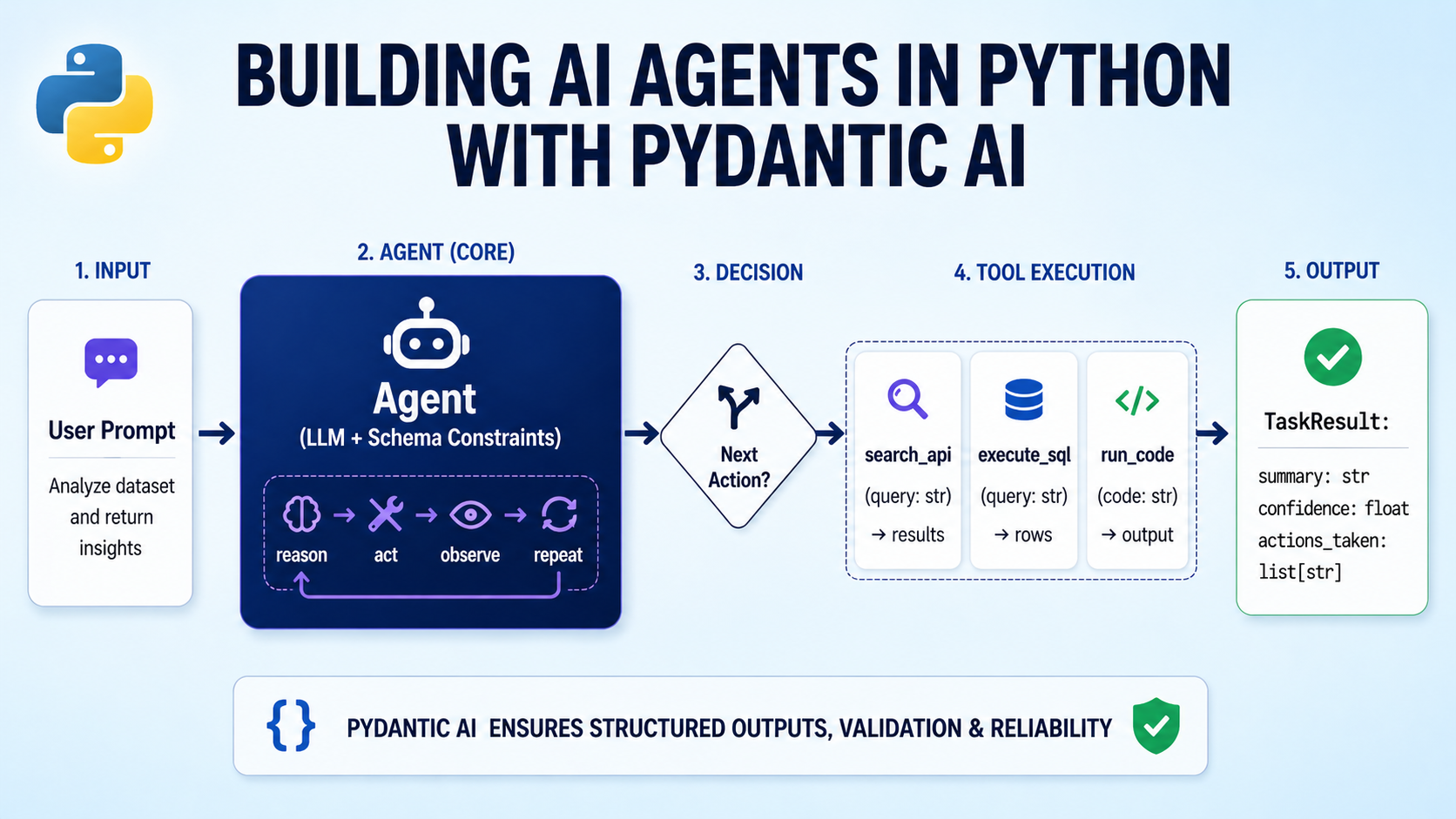
In this article, you will learn how to build production-ready AI agents in Python using Pydantic AI, with structured outputs, custom tools, and dependency injection.
Topics we will cover include:
- How to define Pydantic models for type-safe, validated agent outputs.
- How to register Python functions as tools the agent can invoke during its reasoning cycle.
- How to inject runtime dependencies such as database connections and API clients using a typed RunContext.
Building AI Agents in Python with Pydantic AI
Image by Author
Introduction
AI agents are becoming a core part of production software. They query databases, call APIs, reason over results, and return structured outputs. But most AI agent orchestration frameworks used to build them still feel like glue code. They are often untyped, hard to test, and easy to break as systems grow.
Pydantic AI takes a different approach, bringing strong typing, validation, and clear structure to agentic development. Instead of stitching together loosely connected components, Pydantic AI lets you work with familiar Python patterns. Pydantic AI also lets you validate inputs and outputs, define tools in a clean way, and make agent behavior easier to understand. This helps you build agents that are more reliable and easier to maintain in real-world systems.
In this article, you will learn how to:
- Build a structured agent with clear input and output models using Pydantic AI
- Add tools that the agent can call safely
- Inject runtime dependencies in a clean and testable way
- Use built-in capabilities in Pydantic AI like web search and extended reasoning
By the end, you will have a solid foundation for building useful agents with Pydantic AI. You can find the Colab notebook for reference on GitHub.
Why Pydantic AI?
When you call an LLM directly, the response is a string. It might be JSON, markdown, or something entirely unexpected. Parsing that string into a structured object requires custom logic, error handling, and hope that the model keeps its formatting consistent. In agents that call tools across multiple steps, this fragility compounds fast. Pydantic AI solves this with the following ideas:
Type-safe structured outputs. Define a BaseModel for your agent’s response. The framework instructs the LLM to conform to that schema, validates the response, and retries automatically on failure. You receive a validated Python object, not a string.
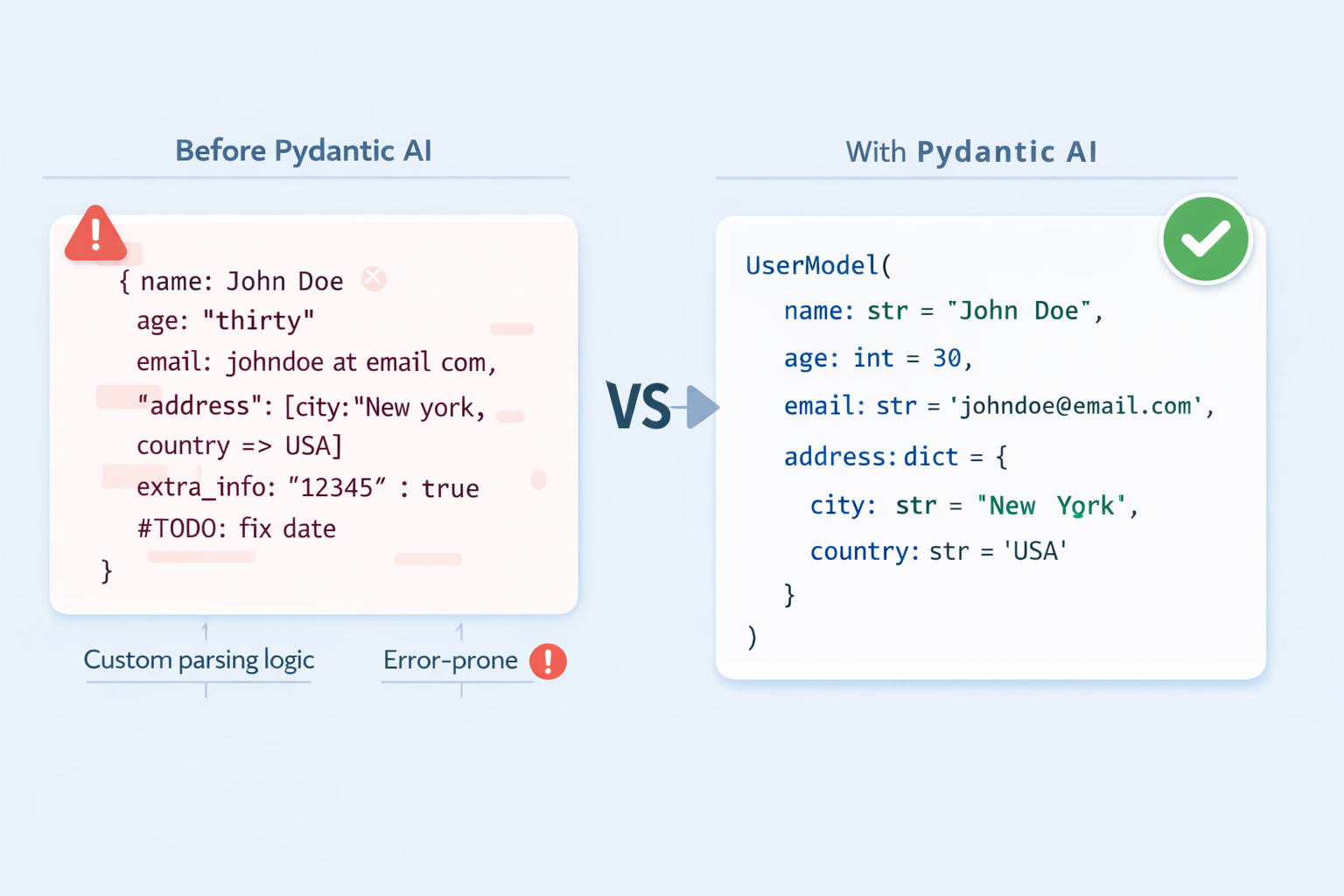
Structured output with Pydantic AI
Function tools with docstring-driven dispatch. Register plain Python functions as tools. The LLM reads their type hints and docstrings to understand what each tool does and when to use it. Your tool definitions are also documentation.
Dependency injection without global state. Agents in production need database connections, API clients, and session data. Pydantic AI provides a type-safe pattern for injecting these at runtime via a RunContext, keeping agent definitions clean and tests easy.
Prerequisites
- Python 3.9+ installed in your working environment
- Familiarity with Pydantic
BaseModeland type hints - Basic understanding of how LLM prompts work
- An API key from a supported provider; this tutorial uses openai:gpt-4o-mini throughout; the same patterns work identically with Anthropic’s Claude, Google Gemini, and others by only changing the model string
Installing Pydantic AI
First, you need the package installed and your API key available in the environment. Create a virtual environment and install Pydantic AI:
python -m venv venv source venv/bin/activate pip install pydantic-ai |
Then set your API key:
export OPENAI_API_KEY="YOUR-API-KEY-HERE" |
Follow a similar procedure for other model providers as well.
Building Your First Agent with Pydantic AI
With the package installed, you can create and run an agent in just a few lines. This confirms your setup works and introduces the two core arguments every agent needs.
from pydantic_ai import Agent agent = Agent( "openai:gpt-4o-mini", instructions="You are a concise assistant. Answer in one or two sentences.", ) |
The model string follows the "provider:model-name" format. Swapping the prefix — to anthropic: or google-gla: for example — switches providers without changing anything else. The instructions argument sets the system-level persona and behavior for all runs.
Now run the agent and print its output:
result = agent.run_sync("What is a large language model?") print(result.output) |
Here’s a sample output:
A large language model is a type of AI system trained on vast amounts of text data to understand and generate human language. It learns statistical patterns across billions of parameters, enabling it to answer questions, summarise content, write code, and more. |
agent.run_sync(...) sends the prompt and blocks until the response arrives. The .output attribute holds the result, a plain string for now. In async applications, use await agent.run(...) instead; the API surface is identical.
Getting Structured, Validated Outputs
A string response is fine for simple Q&A, but most production applications need the LLM to return data in a shape your code can immediately consume — a typed object, not a blob of text to parse. Pydantic AI handles this via the output_type argument. See the structured output docs for a detailed overview.
Start by defining a Pydantic model that describes the data you want back:
from pydantic import BaseModel, Field class JobPosting(BaseModel): job_title: str company_name: str required_skills: list[str] = Field(description="Technical skills explicitly stated") seniority_level: str = Field(description="e.g. Junior, Mid-level, Senior, Lead") is_remote: bool |
Each field maps directly to something you expect the LLM to extract. Field(description=...) annotations give the model extra hints; use them to reduce validation retries.
Next, create the agent with output_type set to your model and run it against some raw text:
from pydantic_ai import Agent agent = Agent( "openai:gpt-4o-mini", output_type=JobPosting, instructions="Extract structured job posting information. Only include what is explicitly stated.", ) result = agent.run_sync(""" We are hiring a Senior Python Engineer at CoolData Inc. The role is fully remote. Required: FastAPI, PostgreSQL, Docker. Kubernetes is a plus. """) posting = result.output print(posting.job_title, posting.seniority_level, posting.is_remote) |
You should get a similar output:
Senior Python Engineer Senior True |
You can also check the full validated object like so:
print(posting.model_dump()) |
This outputs:
{ "job_title": "Senior Python Engineer", "company_name": "CoolData Inc.", "required_skills": ["FastAPI", "PostgreSQL", "Docker"], "seniority_level": "Senior", "is_remote": True } |
When output_type is set, Pydantic AI converts your model’s fields into a JSON schema and sends it alongside the prompt. The response is validated on arrival; if any field is missing or mistyped, the framework retries automatically before surfacing an error.
Giving Your Agent Tools
Language models have no access to the outside world. Tools bridge this gap: you register Python functions that the LLM can invoke during its reasoning cycle, receive the results, and continue reasoning before producing its final output.
First, define the data source and the output model the agent will return:
|
1 2 3 4 5 6 7 8 9 10 11 12 13 14 15 16 17 18 |
import json from pydantic import BaseModel from pydantic_ai import Agent NUTRITION_DB = { "chicken breast": {"calories": 165, "protein_g": 31, "carbs_g": 0, "fat_g": 3.6}, "brown rice": {"calories": 216, "protein_g": 5, "carbs_g": 45, "fat_g": 1.8}, "broccoli": {"calories": 55, "protein_g": 3.7,"carbs_g": 11, "fat_g": 0.6}, "olive oil": {"calories": 119, "protein_g": 0, "carbs_g": 0, "fat_g": 13.5}, } class MealSummary(BaseModel): total_calories: int total_protein_g: float total_carbs_g: float total_fat_g: float health_verdict: str recommendation: str |
Here, NUTRITION_DB is a stand-in for any external data source: a real database, an API, and more. MealSummary is what we want the agent to return after reasoning over the tool results.
Now create the agent and register a lookup tool with @agent.tool_plain:
agent = Agent( "openai:gpt-4o-mini", output_type=MealSummary, instructions="Use tools to look up ingredient data, compute totals, and give a verdict.", ) @agent.tool_plain def get_ingredient_nutrition(ingredient: str) -> str: """ Look up calories, protein, carbs, and fat per 100g for a single ingredient. Returns an error message if the ingredient is not found in the database. """ data = NUTRITION_DB.get(ingredient.lower().strip()) if data: return json.dumps({"ingredient": ingredient, **data}) return f"Not found. Available: {', '.join(NUTRITION_DB)}" |
@agent.tool_plain is for functions that need no access to the run context — just their own arguments. The docstring is not optional: the LLM reads it to decide when to call the tool and how to interpret the result. A vague or missing docstring leads to the model calling tools at the wrong time.
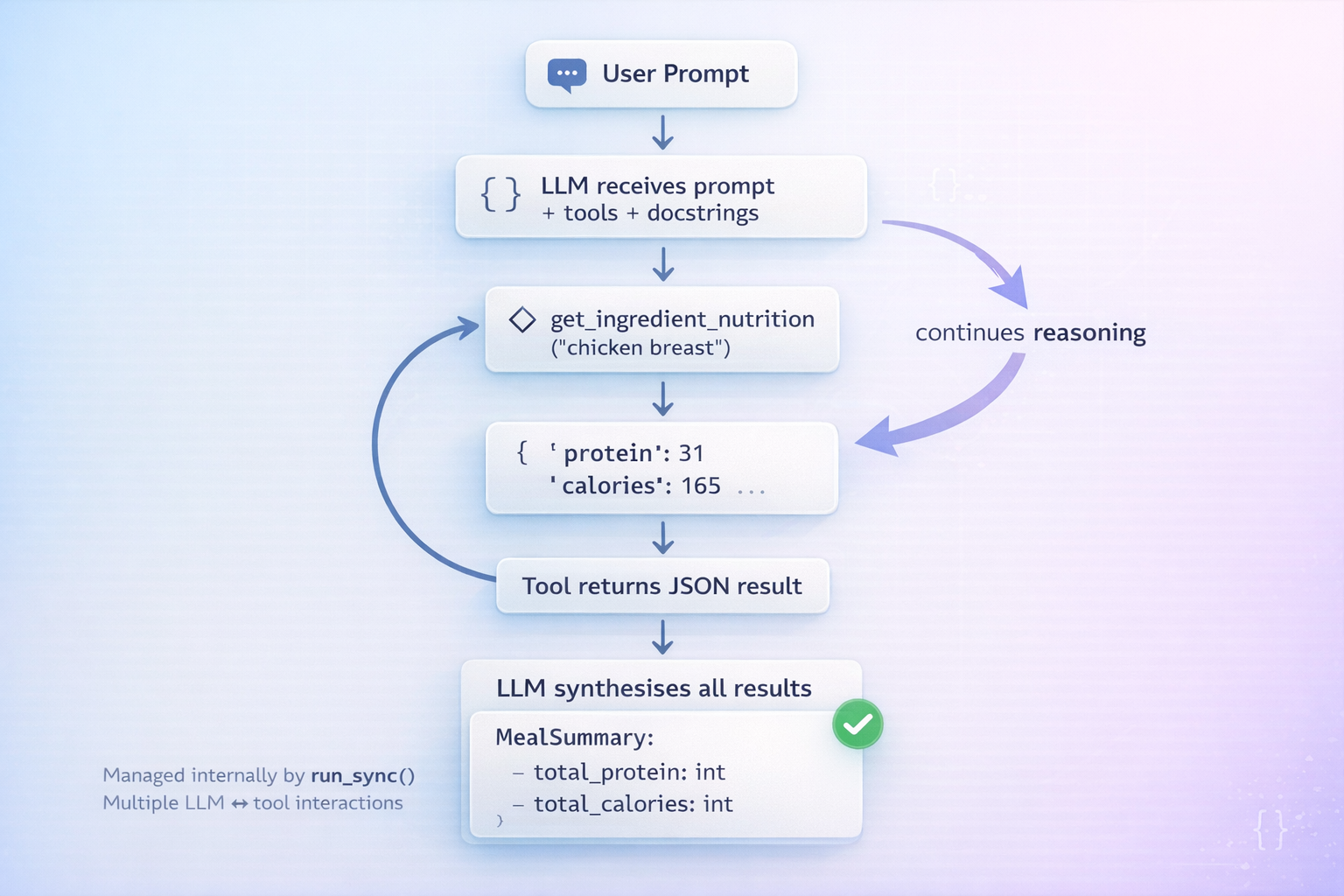
Giving your agent tools in Pydantic AI
Finally, run the agent:
result = agent.run_sync( "Analyse: 200g chicken breast, 150g brown rice, 100g broccoli, 10g olive oil." ) print(result.output.model_dump()) |
Here’s a sample output:
{ "total_calories": 662, "total_protein_g": 75.55, "total_carbs_g": 101.5, "total_fat_g": 17.25, "health_verdict": "Well-balanced, high-protein meal.", "recommendation": "Good post-workout option. Consider adding healthy fats like avocado if increasing caloric intake." } |
The agent calls get_ingredient_nutrition once per ingredient, accumulates the results, computes totals, and returns a validated MealSummary. Each tool call is a round-trip with the LLM, so keep tool functions lightweight and scope their docstrings tightly.
Dependency Injection in Practice
Hardcoding the nutrition database directly in the module works for demos, but in production your agent needs access to things created at runtime: a live database connection, an authenticated API client, or user session data. Pydantic AI’s dependency injection pattern handles this cleanly via a typed RunContext.
Start by wrapping the data source in a service class:
from dataclasses import dataclass from pydantic_ai import Agent, RunContext @dataclass class NutritionService: database: dict def lookup(self, ingredient: str) -> dict | None: return self.database.get(ingredient.lower().strip()) def all_ingredients(self) -> list[str]: return list(self.database.keys()) |
NutritionService is the contract between the agent and the data layer. In production you would hold a real database connection here; in tests you swap in a mock with no changes to the agent.
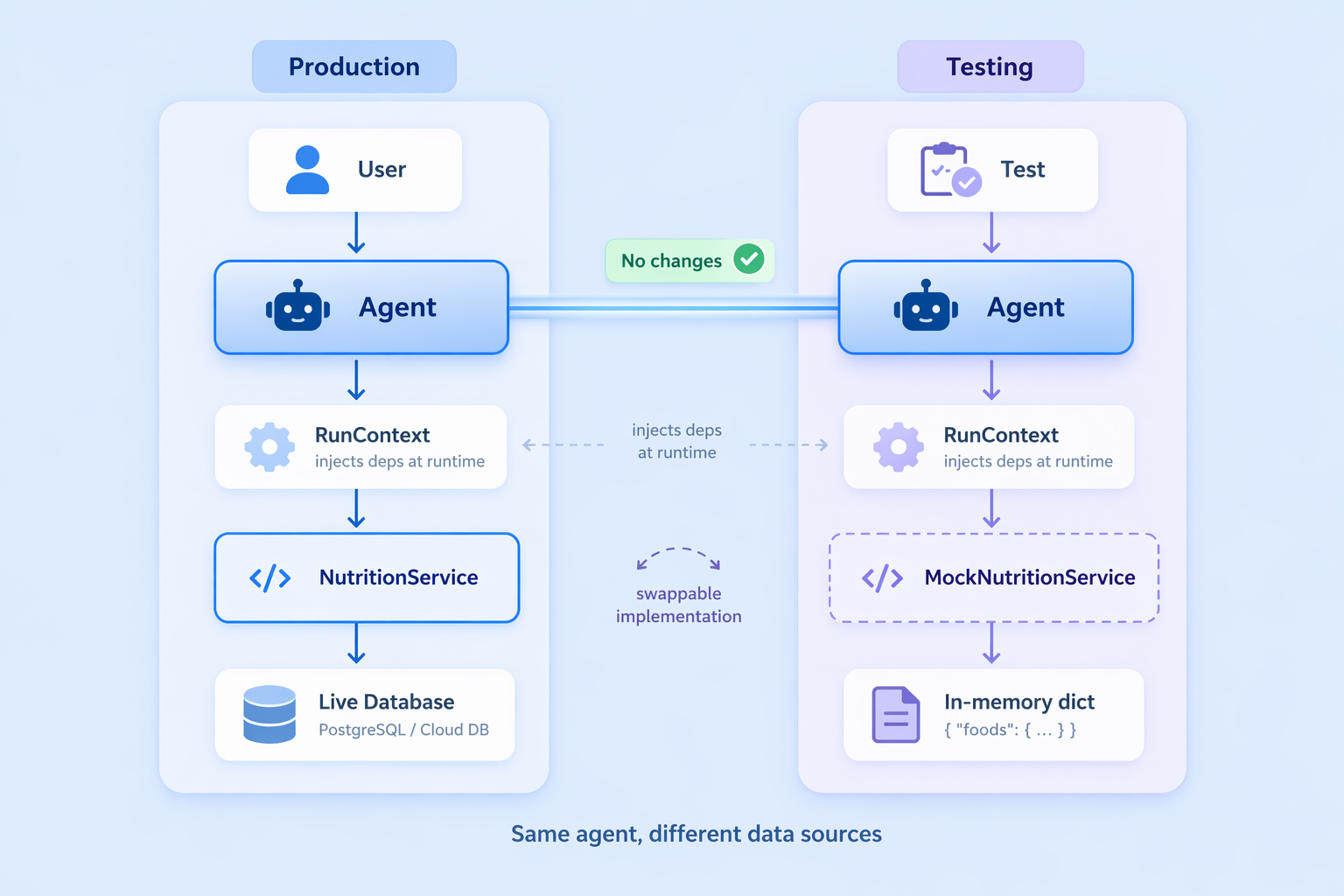
Dependency injection in Pydantic AI
Declare the dependency type on the agent, then update the tool to accept a
RunContext:agent = Agent( "openai:gpt-4o-mini", output_type=MealSummary, deps_type=NutritionService, instructions="Use tools to compute meal totals and provide a verdict.", ) @agent.tool def get_ingredient_nutrition(ctx: RunContext[NutritionService], ingredient: str) -> str: """Look up nutritional info (per 100g) for a single ingredient.""" data = ctx.deps.lookup(ingredient) if data: return json.dumps({"ingredient": ingredient, **data}) return f"Not found. Available: {', '.join(ctx.deps.all_ingredients())}" |
@agent.tool (not tool_plain) is used when the function needs the run context. ctx.deps holds the injected service instance, fully typed.
Inject the service at call time by passing it to deps:
service = NutritionService(database=NUTRITION_DB) result = agent.run_sync("Analyse: 150g chicken breast, 200g brown rice.", deps=service) |
The payoff is clean, isolated testing. Swap in a mock without modifying the agent definition at all:
mock_service = NutritionService(database={"test item": {"calories": 100, "protein_g": 10, "carbs_g": 10, "fat_g": 5}}) with agent.override(deps=mock_service): result = agent.run_sync("Analyse 100g test item.", deps=mock_service) assert result.output.total_calories == 100 |
The agent never knows or cares where the data comes from; the NutritionService interface is the only contract.
Using Built-in Capabilities in Pydantic AI
Pydantic AI ships with composable capabilities that extend your agent without cluttering the constructor. Pass them via the capabilities argument; they work with any supported provider.
Web search gives the agent live internet access. For finer control over domains and usage limits, see the built-in tools docs:
from pydantic_ai import Agent from pydantic_ai.capabilities import WebSearch agent = Agent("openai:gpt-4o-mini", capabilities=[WebSearch()]) result = agent.run_sync("What is the current price of gold?") |
Thinking enables step-by-step reasoning before the final answer, which is useful for complex or ambiguous tasks. Effort levels “low”, “medium”, and “high” map to each provider’s native format. See the thinking docs for provider-specific details:
from pydantic_ai import Agent from pydantic_ai.capabilities import Thinking agent = Agent("openai:gpt-4o-mini", capabilities=[Thinking(effort="high")]) result = agent.run_sync("Design a schema for a multi-tenant SaaS billing system.") |
Capabilities compose cleanly. You can combine them by passing both in the list:
from pydantic_ai.capabilities import Thinking, WebSearch agent = Agent( "openai:gpt-4o-mini", instructions="You are a research assistant.", capabilities=[Thinking(effort="high"), WebSearch()], ) result = agent.run_sync("What were the biggest AI research breakthroughs this month?") |
The agent reasons over what to search for, fetches live results, and synthesizes them into a single response.
Summary and Next Steps
Here is what you built:
- A basic agent with
run_syncand a model string, followed by structured output withoutput_type, turning LLM responses into validated Python objects - Custom function tools using
@agent.tool_plainand@agent.tool, with docstring-driven dispatch - Runtime dependency injection via
RunContextanddeps_type, keeping agent definitions decoupled from data sources - Built-in capabilities for web search and extended thinking, composed via the
capabilitiesparameter
To go deeper, you can explore advanced toolsets and MCP server integration through function tools, along with the full suite of built-in tools. Thinking configurations let you fine-tune provider-specific reasoning behavior, while dependency injection patterns make your system easier to test and maintain. When you pair Pydantic AI with Logfire, you also gain real-time observability across every LLM call, tool invocation, and validation retry, giving you clear insight into how your system behaves in practice.