in a situation where you have plenty of ideas on how to improve your product, but no time to test them all? I bet you have.
What if I told you that you no longer have to do it all on your own, you can delegate it to AI. It can run dozens (or even hundreds) of experiments for you, discard ideas that don’t work, and iterate on the ones that actually move the needle.
Sounds amazing. And that’s exactly the idea behind autoresearch, where an LLM operates in a loop, continuously experimenting, measuring impact, and iterating from there. The approach sounded compelling, and many of my colleagues have already seen benefits from it. So I decided to try it out myself.
For this, I picked a practical analytical task: marketing budget optimisation with a bunch of constraints. Let’s see whether an autonomous loop can reach the same results as we did.
Background
Let’s start with some background to set the context. Autoresearch was developed by Andrej Karpathy. As he wrote in his repository:
One day, frontier AI research used to be done by meat computers in between eating, sleeping, having other fun, and synchronizing once in a while using sound wave interconnect in the ritual of “group meeting”. That era is long gone. Research is now entirely the domain of autonomous swarms of AI agents running across compute cluster megastructures in the skies. The agents claim that we are now in the 10,205th generation of the code base, in any case no one could tell if that’s right or wrong as the “code” is now a self-modifying binary that has grown beyond human comprehension. This repo is the story of how it all began. -@karpathy, March 2026.
The idea behind autoresearch is to let an LLM operate on its own in an environment where it can continuously run experiments. It changes the code, trains the model, evaluates whether performance improves, and then either keeps or discards each change before repeating the loop. Eventually, you come back and (hopefully) find a better model than you started with. Using this approach, Andrej was able to significantly improve nanochat.
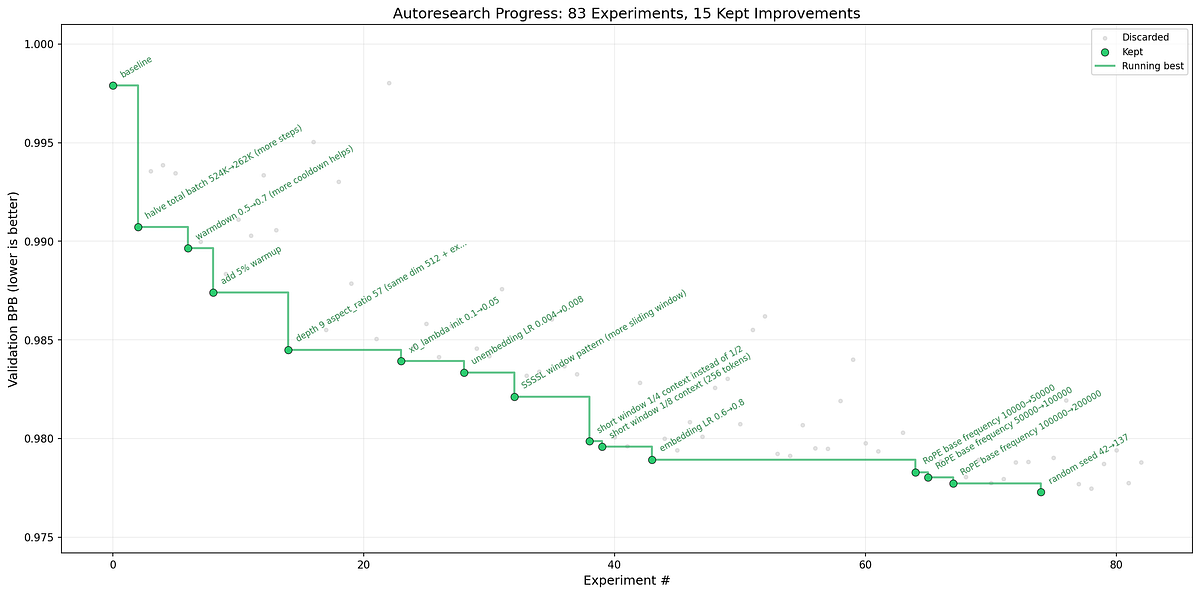
The original implementation was focused on optimising an ML model. However, simialr approach can be applied to any task with a clear objective (from reducing website load time to minimising errors when scraping with Playwright). Shopify later open-sourced an extension of the original autoresearch, pi-autoresearch. It builds on pi, a minimal open-source terminal coding harness.
It follows a similar loop to the original autoresearch, with a few key steps:
- Define the metric you want to improve, along with any constraints.
- Measure the baseline.
- Hypothesis testing: in each iteration, the agent proposes an idea, writes it down, and tests it. There are three possible outcomes: it doesn’t work (discard), it worsens the metric (discard), or it improves the target (keep it and iterate from there).
- Repeat: the loop continues until you stop it, improvements plateau, or it reaches a predefined iteration limit.
So the core idea is to define a clear objective and let the agent try bold ideas and learn from them. This approach can uncover potential improvements to your KPIs by testing ideas your team simply never had the time to explore. It definitely sounds interesting, so let’s try it out.
Task
I would like to test this approach on an analytical task, since in analytical day-to-day tasks we often have clear objectives and need to iterate multiple times to reach an optimal solution. So, I went through all the posts I’ve written for Towards Data Science over the years and found a task around optimising marketing campaigns, which we discussed in the article “Linear Optimisations in Product Analytics”.
The task is quite common. Imagine you work as a marketing analyst and need to plan marketing activities for the next month. Your goal is to maximise revenue within a limited marketing budget ($30M).
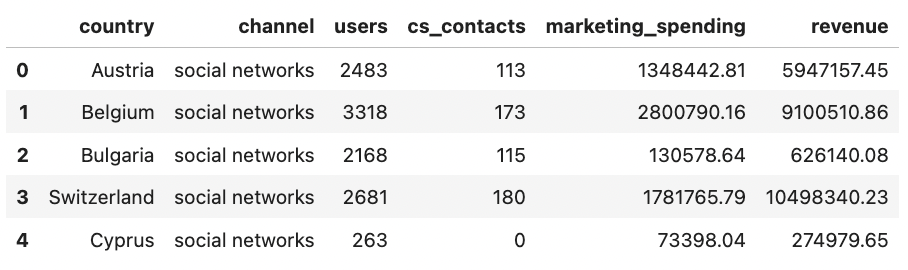
You have a set of potential marketing campaigns, along with projections for each of them. For each campaign, we know the following:
countryand marketingchannel,marketing_spending— investment required for this activity,revenue— expected revenue from acquired customers over the next 12 months (our target metric).
We also have some additional information, such as the number of acquired users and the number of customer support contacts. We will use these to iterate on the initial task and make it progressively more challenging by adding extra constraints.
It is useful to give the agent a baseline approach so it has something to start from. So, let’s put it together. One simple solution for this optimisation is to focus on the top-performing segments by revenue per dollar spent. We can sort all campaigns by this metric and select the ones that fit within the budget. Of course, this approach is quite naive and can definitely be improved, but it provides a good starting point.
import pandas as pd

df = pd.read_csv('marketing_campaign_estimations.csv', sep='\t')

# --- Baseline: greedy by revenue-per-dollar ---
df['revenue_per_spend'] = df.revenue / df.marketing_spending
df = df.sort_values('revenue_per_spend', ascending=False)
df['spend_cumulative'] = df.marketing_spending.cumsum()
selected_df = df[df.spend_cumulative <= 30_000_000]

total_spend = selected_df.marketing_spending.sum()
revenue_millions = selected_df.revenue.sum() / 1_000_000

assert total_spend <= 30_000_000, f"Budget violated: {total_spend}"

print(f"METRIC revenue_millions={revenue_millions:.4f}")
print(f"Segments={len(selected_df)} spend={total_spend/1e6:.2f}M")
I put this code in optimise.py in the repository.
If we run the baseline, we see that the resulting revenue is 107.9M USD, while the total spend is 29.2M.
python3 optimise.py
# METRIC revenue_millions=107.9158
# Segments=48 spend=29.23M
Setting up
Before moving on to the actual experiment, we first need to install pi_autoresearch. We start by setting up pi itself by following the instructions from pi.dev. Luckily, it can be installed with a single command, giving you a pi coding harness up and running locally that you can already use to help with coding tasks.
npm install -g @mariozechner/pi-coding-agent # install pi
pi # start pi
/login  # select provider and specify APIKey
However, as mentioned earlier, our goal is to try the pi-autoresearch extension on top of pi, so let’s install that as well.
pi install https://github.com/davebcn87/pi-autoresearchI also wanted some guardrails in place, so I created an autoresearch.config.json file in the root of my repo to define the maximum number of iterations. This helps limit how many iterations the agent can run and, in turn, keeps token costs under control during experiments. You can also set a per-API-key spending limit with your LLM provider for even tighter control.
{
  "maxIterations": 30
}
You can find all the details on configuration in the docs.
That’s it. The setup is done, and we’re ready to start the experiment.
Experiments
Finally, it’s time to start using the autoresearch approach to figure out which marketing campaigns we should run. I’m pretty sure our initial approach is not optimal, so let’s see whether autoresearch can improve it. Let the journey begin.
I started autoresearch by calling the skill.
/skill:autoresearch-createAfter that, autoresearch tries to infer the optimisation goal, and if it fails, it asks for additional details.
In my case, it simply inspected the code we implemented in optimise.py and created an autoresearch.md file summarising the task. Here’s what we got (a pretty solid summary, considering it only saw our baseline optimisation function). We can see that it clearly defined the metrics and constraints. I also liked that it explicitly highlighted that changing the input data is not allowed. That’s a good guardrail.
# Autoresearch: maximize marketing campaign revenue under budget

## Objective
Improve `optimise.py` so it selects a set of campaign segments with **maximum total revenue** while respecting the fixed marketing budget of **30,000,000**. The current implementation is a greedy heuristic: it sorts by revenue-per-spend, takes a cumulative prefix, and stops once the next item would exceed budget. That means it can leave budget unused and never consider cheaper profitable items later in the sorted list.

The workload is tiny (62 rows), so higher-quality combinatorial optimization strategies are likely practical. We should favor exact or near-exact selection logic over fragile heuristics when the runtime stays fast.

## Metrics
- **Primary**: `revenue_millions` (millions, higher is better) - total selected revenue divided by 1,000,000
- **Secondary**:
  - `spend_millions` - total selected spend divided by 1,000,000
  - `budget_slack_millions` - unused budget in millions
  - `segment_count` - number of selected segments

## How to Run
`./autoresearch.sh` - runs a quick syntax pre-check, then `optimise.py`, which must emit `METRIC name=number` lines.

## Files in Scope
- `optimise.py` - campaign-selection logic and metric output
- `autoresearch.sh` - benchmark harness and pre-checks
- `autoresearch.md` - session memory / findings
- `autoresearch.ideas.md` - backlog for promising deferred ideas

## Off Limits
- `marketing_campaign_estimations.csv` - input data; do not edit
- Git history / branch structure outside the autoresearch workflow

## Constraints
- Must keep spend `<= 30_000_000`
- Must keep the script runnable with `python3 optimise.py`
- No dataset changes
- Keep the solution simple and explainable unless extra complexity yields materially better revenue
- Runtime should remain fast enough for many autoresearch iterations

## What's Been Tried
- Baseline code sorts by `revenue / marketing_spending`, computes cumulative spend, and keeps only the sorted prefix under budget.
After defining the task, it immediately started the loop. It can run for some time, but you still retain visibility. You can see both its reasoning and some key stats in the widget (such as the current iteration, best target value, and improvement over the baseline), which is quite handy.
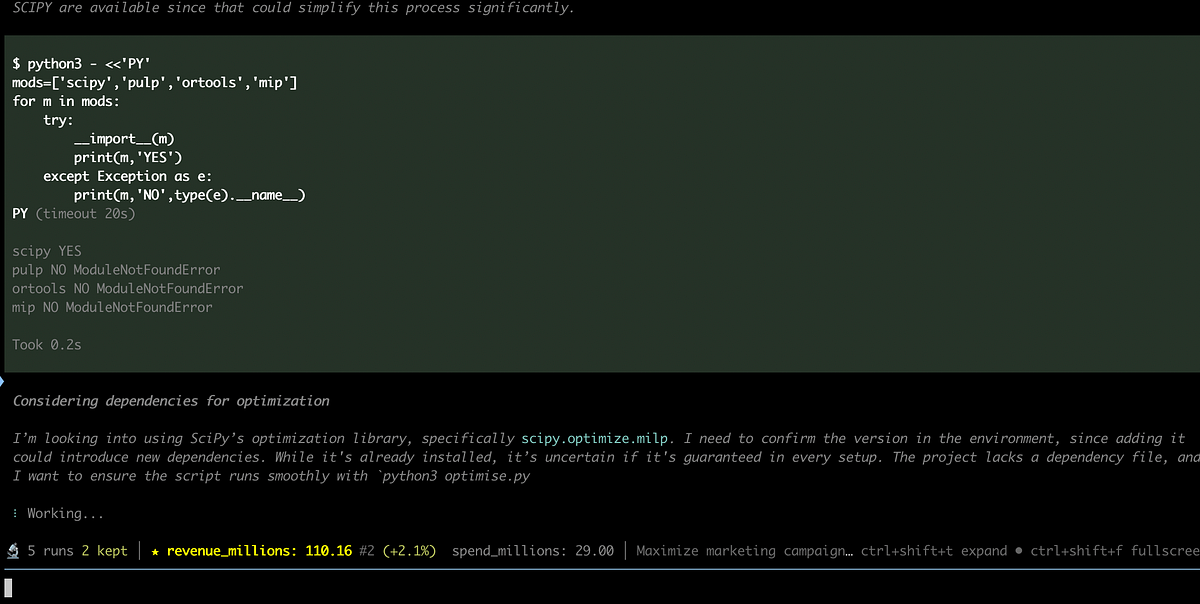
As it iterates, it also writes an autoresearch.jsonl file with full details of each experiment and the resulting target metric. This log is very useful both for reviewing what has been tried and for the model itself to keep track of which hypotheses it has already tested.
In my case, despite the configured limit of 30 iterations, it decided to stop after just 5. The agent explored several different strategies: exact knapsack optimisation, search-space pruning, and a Pareto-frontier dynamic programming approach. Let’s go through the details:
- Iteration 1: Reproduced our baseline approach. The prefix-greedy strategy (revenue/spend) reached 107.9M, but stopped early when items didn’t fit, missing better downstream combinations. No breakthrough here, just a sanity check of the baseline.
- Iteration 2: Exact knapsack solver. The agent switched to a branch-and-bound (0/1 knapsack) approach and reached 110.16M revenue (+2.25M uplift), which is a clear improvement. A strong gain already in the second iteration.
- Iteration 3: Dominance pruning. This iteration attempted to shrink the search space by removing pairwise dominated segments (i.e., segments worse in both spend and revenue than another). While intuitive, this assumption doesn’t hold in the 0/1 knapsack setting: a “dominating” segment may already be selected, while a “dominated” one can still be useful in combination with others. As a result, this approach failed and dropped to 95.9M revenue, and was discarded. A good example of trial and error. We tested it, it didn’t work, and we immediately moved on.
- Iteration 4: Dynamic programming frontier. The agent switched to a Pareto-frontier dynamic programming approach, but it achieved the same result as iteration 2. From an analyst perspective, this is still useful. It confirms we’ve likely reached the optimum.
- Iteration 5: Integer accounting. This iteration converted all monetary values from floats to integer cents to improve numerical stability and reproducibility, but again produced the same final value. It makes sense that the agent stopped there.
So in the end, the optimal solution was already found in the second iteration and it matches the solution we found in my article with linear programming. The agent still tried a few other ideas, but kept ending up with the same result and eventually stopped (instead of burning even more tokens).
Now we can finish the research by running the /skill:autoresearch-finalize command, which commits and pushes everything to GitHub. As a result, it created a new branch with a PR, saving both the changes to the optimise.py code and the intermediate reasoning files. This way, we can easily track what happened throughout the process.
The agent easily solved our initial task. Next, let’s try making it more realistic by adding additional constraints from the Operations team. Assume we realised that we also need to ensure there are no more than 5K incremental customer support tickets (so the Ops team can handle the load), and that the overall customer contact rate stays below 4.2%, since this is one of our system health checks. This makes the problem more challenging, as it adds extra constraints and forces the agent to revisit the solution space and search for a new optimum.
To kick this off, I simply restarted the /skill:autoresearch-create process, providing the additional constraints.
/skill:autoresearch-create I have additional constraints for our CS contacts to ensure that our Operations
team can handle the demand in a healthy way:
- The number of additional CS contacts ≤ 5K
- Contact rate (CS contacts/users) ≤ 0.042
This time, it picked up exactly where we left off. It already had full context from the previous run, including everything we had done so far. As a result of updating the task, the agent revised the autoresearch.md file to include the new constraints.
## Constraints
- Must keep spend `<= 30_000_000`
- Must keep additional CS contacts `<= 5_000`
- Must keep contact rate `<= 0.042`
- Must keep the script runnable with `python3 optimise.py`
- No dataset changes
- Keep the solution simple and explainable unless extra complexity yields materially better revenue
- Runtime should remain fast enough for many autoresearch iterations
It ran 8 additional iterations and converged to the following solution (again matching what we had seen previously):
- Revenue: $109.87M,
- Budget spent: $29.9981M (under $30M),
- Customer support contacts: 3,218 (under 5K),
- Contact rate: 0.038 (under 0.042).
After introducing the new constraints, the agent reformulated the problem and switched to an exact MILP solver. It quickly found the optimal solution, reaching 109.87M revenue while satisfying all constraints. Most of the later iterations didn’t really change the result, they just cleaned things up: removed fallback logic, reduced dependencies, and improved runtime. So, once the problem was well-defined, the agent stopped “searching” and started “engineering”. What’s even more interesting is that it knew when to stop optimising and didn’t run all the way to the 30-iteration limit.
Finally, I asked the agent to finalise the research. This time, for some reason, /skill:autoresearch-finalize didn’t push all the changes, so I had to manually ask pi to create two PRs: one with clean code changes, and another with the reasoning and supporting files. You can go through the PRs if you want to see more details about what the agent tried.
That’s all for the experiments. We got amazing results and was able to see the capabilities of autoresearch. So, it’s time to wrap it up.
Summary
That was a really interesting experiment. The agent was able to reach the same optimal solution we previously found, completely on its own. While it didn’t push the result further (which is not surprising given how well-studied problems like knapsack are), it was impressive to see how an LLM can iteratively explore solutions and converge to a solid outcome without manual guidance.
I believe this approach has strong potential across multiple domains (from training ML models and solving analytical tasks to more engineering-heavy problems like optimising system performance or loading times). In many teams, we simply don’t have the time to test all possible ideas, or we dismiss some of them too early. An autonomous loop like this can systematically try different approaches and validate them with actual metrics.
At the same time, this is definitely not a silver bullet. There will be cases where the agent finds “optimal” solutions that are not feasible in practice, for example, improving website loading speed at the cost of breaking user experience. That’s where human supervision becomes critical: not just to validate results, but to ensure the solution makes sense holistically.
From what I’ve seen, this approach works best when you have a clear objective, well-defined constraints, and something measurable to optimise. It’s much harder to apply it to more ambiguous problems, like making a product more user-friendly, where success is less clearly defined.
Overall, I’d definitely recommend trying out pi-autoresearch or similar tools on your own problems. It’s a powerful way to test ideas you wouldn’t normally have time to explore and see what actually works in practice. And there’s something almost magical about your product improving while you sleep.
Disclaimer: I work at Shopify, but this post is independent of my work there and reflects my personal views.