that working with AI in production is pretty expensive. We all know this and we know most vendors are working pretty hard to figure out how to make agents cheaper.
This is why I thought it was a good idea to go through a few design principles to keep in mind when you’re building, which can help you understand where you can grab some savings.
We’ll go through how prompt caching works and why it’s a quick win, semantic caching, lazy-loading tools and MCPs, routing and cascading, delegating to subagents, and a bit on keeping the context clean.
I am including interactive graphs throughout this article — that helps you visualize the cost savings each principle can get you based on the amount of tokens you are using.
Yes, I am obviously staying real throughout, every saving comes with trade-offs.
Agents get expensive as the context grows
Your first agent might ship with a 500-token system prompt and two tools, but once it grows up, those numbers balloon fast.
Just to illustrate, the leaked Claude system prompt ran around 24,000 tokens, GPT-5’s around 15,000. People have complained that a simple “hi” in Claude Code with an empty folder consumed roughly 31,000 tokens. OpenClaw users have reported more than 150,000 input tokens sent to Gemini 3.1 Pro for 29 tokens of output on the first turn.
Add in tools and MCP servers and the numbers get genuinely ridiculous. Tool definitions alone can run into the tens of thousands of tokens. Skip cleaning up tool outputs and old conversation exhaust and you’re paying for that junk on every turn too.
Without optimization, 100 messages a day at 166K input tokens runs around $996 a month on Gemini 3.1 Pro and roughly $2,490 on Claude Opus 4.6.
There are tricks to keep these costs down, though plenty of production setups fail to use them correctly so let’s go through them all in detail.
Four design principles to keep in mind
In this article we’ll go through four different principles with four different interactive calculators.

First, we’ll be looking at how to reuse tokens when possible, looking at prompt caching and semantic caching. Then we’ll look at how to minimize the stable and always added tokens like memory and tool definitions.
It will also go through how to route to smaller models, or escalate to a larger model, looking at the quality risks and the savings thereof.
The last section will talk about keeping the context clean for performance and economic reasons, while briefly mentioning compaction.
Reuse tokens when possible
LLM cost doesn’t just come from calling the model too often. It also comes from repeatedly paying to process the same tokens again and again.
So for this section we’ll cover K/V caching, the mechanism under prompt caching, and semantic caching, which are two very different things. We’ll go through what they are, what they do, what you can save.
Prompt caching is a quick win for long system prompts, while semantic caching is a bit more work and comes with a bit more risk.
K/V caching & prefix caching
Before a model can generate anything, it first has to process the prompt. This step is called prefill. Prefill costs compute, which means latency and money. So, to be efficient, we shouldn’t keep re-processing the same content.
When you use a large language model, the prompt first gets tokenized, then those tokens turn into vectors, and then inside each attention layer those vectors get projected into K/V tensors.

The inference engine has to cache the K/V tensors during generation, otherwise the math doesn’t work at any reasonable speed. After it has finished it throws that cache away.
But instead of throwing the cache away when the response ends, we can store it, tagged in a way that lets us find it again.
Next time a request comes in, we’d check whether that same part of the prompt matches something we already have tensors for. If yes, we load those tensors and skip re-processing it.

To get a sense of why this matters economically: let’s say it takes one second to process 2,000 tokens, and you have a system prompt of 10,000 tokens.
That’s 5 seconds saved on every single LLM call, just by not recomputing that same start of the prompt through the model over and over again (though prefill throughput varies a lot based on the setup).
It’s important to note that we have to match the text exactly to the stored K/V cache.
If the tokens change, we don’t have precomputed K/V tensors for that exact part of the prompt anymore, so it has to be processed again. This is where people keep stumbling: a new space added, a reordered tool definition, a timestamp in the wrong place.
So, storing the cache has real value in terms of speeding up the request, and in turn making the request cheaper.
Note that storing these tensors is not free. Cached K/V takes up memory on the serving side.
Now, we don’t have to build this ourselves, this was just to think through the mechanics. There are frameworks that help with this, and the API providers have their own prompt-caching rules, and we’ll go through both.
Prefix caching for self-hosted inference
If you are hosting an open source model, you’d ideally use an LLM serving framework, like vLLM. Though there are other frameworks that will help with the caching layer, vLLM has an add-on feature we can run through.
To help with this, vLLM chops up the prompt into blocks, hashes each block based on its tokens (plus the tokens before it), and store the K/V tensors against those hashes.
Like most setups the static part that should be cached should go in the first part of the prompt.
To enable caching in vLLM use the flag --enable-prefix-caching
Other flags let you adjust the --block-size and then I think it lets you explicitly set KV cache size per GPU with something like --kv-cache-memory-bytes
Block sizes means tokens per block. If block size is 16 then you have 16 tokens per block before it cuts off and starts another. 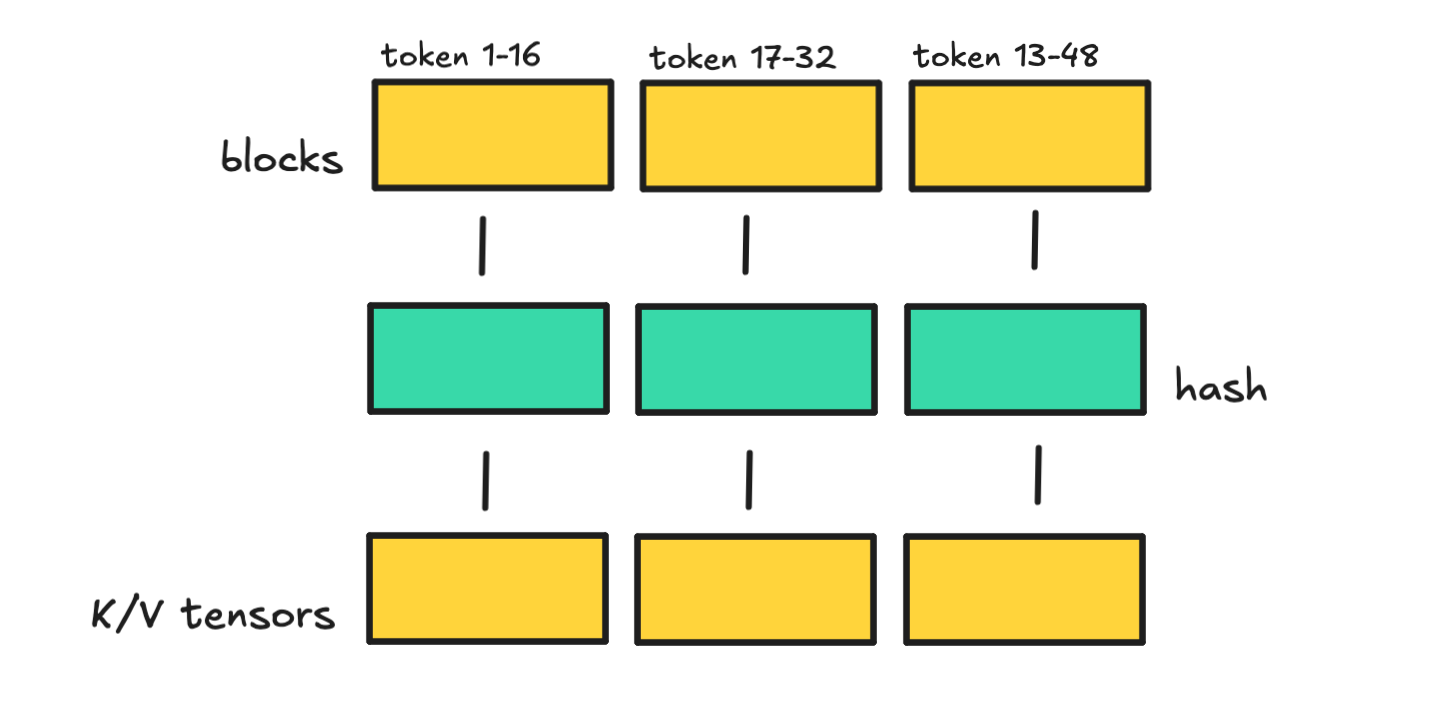
The more memory you give it, the longer it can hold on to cached blocks. But if you have lots of different long requests happening at the same time, that memory fills up faster, so old blocks get removed faster.
There are other solutions out there, but you get the idea. It’s the same mechanics we spoke about for the previous section.
You can also check out SGLang and RadixAttention for prefix caching, as well as LMCache that should plug into serving engines.
Most people though use the API providers and they have their own policies on how to use prompt caching so let’s walk through those.
Prompt caching via API providers
Using the API providers you need to make sure to structure your prompts so they hit the cache. There are things you need to follow for this to be done correctly.
I will use OpenAI first here as an example.
For OpenAI, they are explicit, to cache part of the prompt they require an exact prefix match. I.e. the same static input at the start of the prompt.

This means you always put stable instructions, examples, and tools first, and variable content later.

You can also send in prompt-cache-key which can help route similar requests together and improve cache hit rates.
There are more specifics around this too. Caching is enabled automatically for prompts that are 1,024 tokens or longer, but they use the first 256 tokens to route requests back to the same cache. So, that static part of the prompt needs to be more than 256 tokens.
For Anthropic you have to enable caching with the cache-control parameter.
Worth mentioning too that typically the evictions (TTL) occur around 5–10 minutes of inactivity but can be extended. It’s the same for Anthropic but you can push it to one hour (but it would cost you more at 2x).
Earlier I talked about the time you save, and if you’re self-hosting, this also saves money. With API providers, the savings show up as cheaper cached input tokens.
With OpenAI cached input is up to 90% off the base input.
Anthropic gives you the same discount on cached inputs, but you also pay to store that cache. So, if you’re not using it correctly, Anthropic will be more expensive.
In general though, if you have 90% of your prompt being static, you can save up to 80% on warm calls.

I decided to create an interactive graph for this with Claude here, so you can play around with it.
So, prompt caching is a pretty good win for everyone if you’re using longer system prompts that stay the same and something to consider to save on tokens.
Let’s move onto semantic caching, which is something else entirely.
Semantic caching
Semantic caching matches on meaning, i.e. if it is a similar enough request, return the cached result. Although it sounds easy enough, there are clear pitfalls to watch out for.
To semantically match texts, we use embeddings. You can do some research here if the word is new to you. I wrote about it a few years ago.
In essence, embeddings are vectors that we can compare against each other using cosine similarity. If similarity is high, the meaning should be similar, though it depends on the model.

What semantic caching is proposing is then to match similar requests to answers that already exist. Asking for “What’s the capital of France?” and “Quick, give me the capital of France” should then route to the same answer.
No need to use an LLM to answer the same thing over and over again.
This works fine if many people ask near-identical generic questions and the data isn’t going stale too fast.
So why not do it for every case? There are a ton of pitfalls here.
Just at the top of my head, you need to consider what threshold to use for similarity, how long the answer should stay valid, what happens on multi-turn questions, what actually gets stored, whether there should be a router implemented too, how to separate users, and what happens if the wrong answer is cached.
You also need to consider (Time to Live — TTL), as in when information turns stale and for which questions.
So even though the mechanics are quite simple, you still need metadata filters and tags, such as user, workspace, corpus version, persona, session/user scoping, smart TTL, and some rule for “is the return enough?”
This then turns into a bit of a project.
So, if you want to do it, perhaps use the semantic index to find a previous question. Different questions can point to the same stored answer, which means less storage blowup. Be smart about TTL by usage, if something is reused often, retain it longer, otherwise, remove it.
I would also suggest you do it after you see repetition in the logs rather than at the start. It may be that the use case is just not good for it.
As for how to do it, many databases can do this for you. But there are also libraries like semanticcache, prompt-cache, GPTCache, vCache, Upstash semantic-cache, Redis + LangCache, that help with plumbing.
There are obviously savings here to be made. Redis claims up to 68.8% fewer API calls and 40–50% latency improvement, though be aware this is a bit of marketing as they are using a clear Q&A use cases here.
So it completely depends on your setup. If you have a Q/A agent with a lot of redundant calls, then you can save more. If you have a coding bot with unique calls, then you’ll save less.
Prompt caching does well when the changing question sits inside a large static prompt. Semantic caching does well when people keep asking the same thing in different words.
You can play around with this interactive tool to see the cost savings with both.
Before we move on from this section, I would just point out that there are a lot of savings to be made from standard caching too.
Remember to cache the expensive deterministic stuff like SQL query results, tool outputs, and retrieval results. Never run this stuff more times than you need to.
I do this for one of my tools. It gathers keyword data to summarize, then caches it until that data is stale. If it is stale, it reruns it when that route is hit.
So, semantic caching is an interesting idea and could save you tokens for certain use cases but it takes engineering to do it well.
Don’t preload dormant tokens
This part is about what happens when your system prompt starts growing because of things like bulky tools or growing memory.
For smaller agents, this isn’t really an issue, but if you are working with agent specs that keep growing, there are ways to slim it down and fetch information on-demand (or at least try to).
Keep context slim and fetch details on-demand
Once your agent prompt grows beyond a certain point, it can be good to keep the always-loaded layer as small and stable as possible, and keep growing details separate.
This matters because once these layers start to grow, such as when you load a few hundred tools or send full MCP server descriptions that keep changing, it gets noisy.

The problem is obviously not just cost, but also performance. And if one of these layers keeps changing, prompt caching becomes much harder to hit properly.
So, the idea is to keep the top layer as compact and stable as you can. The top layer should help the model understand where it is and where to go next, but it does not need to carry the whole world up front.

If you’ve looked through the source code for Claude Code, you’ve seen that they use something like this for their memory system.
They have an always-loaded index file that shouldn’t grow beyond 200 lines, with detailed topic files elsewhere. Though what the agent does in practice versus what the system wants is a topic for another time.
You can see the same idea pop up elsewhere too, such as in Claude’s advanced tool setup, Claude Skills’ layered setup, and attempts to lazy-load MCP tools instead of dumping every server definition into the prompt up front.
Where this is done and if it works
The idea is sound. When context grows, it gets harder for an LLM to pick the right action. But this space is still early, so we’ll go through a tool as an example to see how this can work.
A few months ago, Anthropic released something called advanced Tool Search. This goes into the space of how to keep context slim while still giving the model access to hundreds of tools.
Anthropic says they have seen 55K to 134K tokens of tool definitions before optimization, and that wrong tool selection is a common failure mode when the context grows this large.

So, a search tool would then optimize the context by having the LLM use it to find tools, rather than define them all up front.
tools=[
        {
            "type": "tool_search_tool_bm25_20251119",
            "name": "tool_search"
        },
        {
            "name": "search_contacts",
            "description": "Find a contact by name or email.",
            "input_schema": {
                "type": "object",
                "properties": {
                    "query": {"type": "string"}
                },
                "required": ["query"]
            }
        },
        {
            "name": "send_email",
            "description": "Send an email to one or more recipients.",
            "input_schema": {
                "type": "object",
                "properties": {
                    "to": {"type": "string"},
                    "subject": {"type": "string"},
                    "body": {"type": "string"}
                },
                "required": ["to", "subject", "body"]
            },
            "defer_loading": True
        }
    ]
What you see above is that we define one tool called tool_search. You can pick one of the out-of-the-box options, BM25 or Regex, or build your own custom one. Then we set one tool as deferred as an example.
You would only do this if you had 10+ tools though.
Anthropic does the searching for you, so you don’t see how it adds this tool schema into the system prompt, nor do you see how the search happens under the hood.
They do say that once there is a tool match, its definition is appended inline as a tool_reference block in the conversation for the LLM.

The idea is neat: smaller initial context, but you’re still adding one extra search step. People have also tested this tool with somewhat lackluster results, but that was with 4,000 tools, so there is more room for testing.
It’s also on us to define the tools well enough that they can be searched. But it becomes harder to debug what is happening when you can’t see the intermediate step.
This idea pops up elsewhere too, but people generally just call it good AI engineering. Do not expose the agent to huge messy context. Instead, give it a way to narrow things down, and only then let it inspect or load the tool when needed.
For this part, there are serious savings to be made as well, though it depends on how many tokens you are sending in the first place.
We created this additional calculator that compares tool search and prompt caching.

What we see is that both prompt caching and lazy-loading context give you savings, but together it’s not a huge change. Tool search like this isn’t just about savings though as it helps keep the context clean performance wise.
But if you’re just looking for savings, the biggest win is to pick at least one.
Use cheap models for cheap work
This section is about routing prompts to different models, along with using subagents with cheaper models for certain tasks, and how this can decrease token costs but also risk quality.
This space is interesting because most people argue that 60% or more of incoming questions are easy tasks, and thus do not need the strongest model, especially not a thinking one.
ChatGPT does this using signals like conversation type, complexity, tool needs, and explicit intent (“think hard”). Claude uses description-based delegation and built-in subagents like Explore.
The idea is simple to understand, but being able to do it right without risking too much quality is the hard part.
So, let’s go through both predictive routing and output-checked approaches like cascades and subagents, so you can get a feel for what you can test on your own.
The savings that can be made here are very real. I created another interactive graph for this part that you can find here. Be aware it’s vibe-coded, so more of a sort-of-right-please-double-check kind of thing.
Route to models based on task difficulty
Request-level routing means trying to estimate difficulty and intent before seeing any output. The upside is high, but a bad choice can poison the whole session, so there are some quality drawbacks to keep in mind.
To do this, you need some kind of router model that decides where to route the request.

We don’t know exactly what OpenAI uses as signals to route to different models, but I don’t know about you, I frequently feel like I’m being delegated to a less competent model at times and it can be infuriating.
There are ways for us to still gather intel though, looking at the open source community. We can look at RouteLLM from LMSYS, the Berkeley group behind Chatbot Arena. This solution learns from real preference data from Chatbot Arena.
RouteLLM uses standard embeddings and then a tiny router head, so hosting this shouldn’t be that expensive.
I have not tested RouteLLM myself, but they report large cost reductions while keeping most of GPT-4’s performance.
I did, though, dig into the LLMRouterBench paper, which pretty much said that many learned routers barely beat simple baselines, such as keyword/heuristic routing, embedding nearest-neighbor, or kNN-style routing.

This means that the fancy routers around may not give you that much of a boost compared to just using something simple.
As for using a larger LLM as a router, like Haiku, that will just eat into your savings, so it seems pointless. A small fine-tuned classifier carries hosting costs, and a hand-built router, like the example above, is still brittle.
People haven’t abandoned routing because of this, but people are still tinkering with it, so it’s not a slam dunk in terms of savings if the quality of the answers can’t keep up.
Now, there are also out-of-the-box solutions in this space, such as OpenRouter Auto and Switchpoint. However, there is nothing public on their routing internals or public accuracy numbers in the way I wanted.
But for this section, also check out the calculator we did for LLMRouter, heuristics, self-hosted classifier, LLM-as-router, RouteLLM, OpenRouter Auto.
As for quality and how this works for real-world projects, I can’t say before doing better testing on my own first, so this space really deserves its own article in the future.
We should also briefly cover cascading and then subagents before moving on.
Start with cheap and cascade on low confidence
Instead of guessing from the prompt whether a request is “easy” or “hard,” we can also let the cheap model try first, then decide whether to keep that answer or escalate.
Google’s “Speculative Cascades” write-up frames this tradeoff: use smaller models first for cost and speed, and defer to larger models only when needed.
To do this, you have the cheap model generate first, then use a lightweight checker that looks at things like logprobs/token probabilities, entropy or margin-style uncertainty, and/or semantic alignment.

This idea is pretty attractive, as prompt difficulty is often hard to predict and most routers don’t do perfectly. Furthermore, quality is easier to judge after you have an answer.
It also only makes sense if you think most questions can be answered by a simpler model, as you need to pay for two calls for the ones being escalated.
But from the people implementing this, I’ve heard it’s an attractive choice as validation latency between calls can stay under 20ms.
I did look into some open-source implementations like CascadeFlow, which claims 69% savings and 96% quality retention vs GPT-5. But it’s good to note that the prompts they tested had verifiable ground truth, such as math answers and multiple choice.
A main issue to consider is that small models are often “confidently wrong,” so it might make sense to start with conservative thresholds and escalate more often. That will inevitably bring costs up.
I also added in Cascade (cheap-first) into the interactive graph, so you can compare the savings with the other choices. If true, it may slash costs by 50% using this technique, if you need larger models for certain requests at all, that is.
Delegate work to subagents
Subagents are about delegating work to isolated agents. Sometimes these use smaller models, so we can say it’s a form of routing as well. The savings aren’t as steep here, but it’s worth mentioning.
Delegating to subagents is not just about cost. It’s also about keeping the context clean so each agent can fully focus on the task it should complete.
Anthropic ships Claude Code with built-in subagents, as many have seen. The Explore subagent is explicitly a Haiku worker for codebase search and exploration. So, the design principle is there: use smaller models for cheaper tasks.
The main Claude session also delegates via description matching, but we don’t see it. We just get cheaper aggregate cost.
But because the orchestrator often still stays in the loop for planning, synthesis, and retries, you don’t save as much as we saw with routing.

You can look at the graphs we created above and see that subagents may shave off around 11% from the “no routing” option by our calculations, so it is not the main thing to go for if you’re just looking to cut costs.
My next article will dig into subagents, but more as a way to delegate work and isolate tasks when working with deepagents.
Let’s go through the last section before rounding off.
Keep your context clean
Good context engineering is usually about performance, but it can also be about cost efficiency. So, let’s go through context compaction and talk about how keeping the context clean can save tokens.
The issue is that agents keep accumulating junk: tool outputs, logs, repeated observations, old plans, stale attempts, and duplicated state.
This is especially true for people building agents for the first time, where they keep dumping results into the working state for the main agent.
Bad active context

[system rules]
[project rules]
[user task]

grep output: 2,000 lines
file read: 900 lines
test logs: 1,300 lines
retry logs
duplicate reads
old dead-end reasoning
more logs
more logs
more logs
I’ve naturally done this myself too, especially with a draft agent, to see “how it does” first.
But I’ve also seen people complain about OpenClaw context build-up, so it happens everywhere. People complain about it in Claude Code too, because in general, it’s easier to just have it add stuff to it than to work on cleaning it up.
Let’s briefly talk about this without going too much into the performance side, which is also why you should do it.
The hard part is building a state pipeline
This is a two-tier problem. Not only are you “compressing the chat,” but you also need to keep things clean as you add them to the working state, and this becomes tedious engineering work.
First, to keep the context clean, we don’t want this kind of result to start eating up the context.
bad state:
agent does work
→ dumps tool output into context
→ reads files
→ dumps files into context
→ runs tests
→ dumps logs into context
→ retries
→ keeps everything
So, the real job is first to preserve the right state while deleting exhaust as you go along.
Raw output like this can go into an archive, and only what is needed goes into active context. In general, the enemy is probably tool-output bloat here, so the work is to make tools less noisy by default.
Good active context

[system rules]
[project rules]
[user task]
[current working state]

Keep:
+ auth flow lives in auth.ts + session.ts
+ bug only happens on refresh path
+ failing test: session_refresh_keeps_user
+ likely overwrite during refresh
+ files in scope: auth.ts, session.ts, auth.test.ts

Drop:
- raw grep results
- full test logs
- duplicate file dumps
- dead-end retries
I’m also thinking certain pieces of context can have a lifecycle or a set expiry.
Then, once you reach the point where you need to compress it, it will be easier to know what is useful for the LLM.
If we do a little Anthropic reading on long-horizon tasks, they note that you need to figure out a way to preserve architectural decisions, unresolved bugs, and implementation details for compression once it gets to that point as well.
For LangChain’s autonomous compression, they have the agent decide when to compact, instead of only doing it after the context is already bloated, as I think is the case with Anthropic.
It’s interesting that teams are starting to evaluate compression as a systems problem too, with benchmarks and agent-specific policies, not as a generic summarization trick.
We can look at a recent paper here too to get an idea of the results we can get. This one by Jia et al. argued that at 6x compression, it gave a 51.8–71.3% token-budget reduction, while achieving a 5.0–9.2% improvement in issue resolution rates on SWE-bench Verified.
So, this is not just about cost, but also about performance in general.
As for costs, there is obviously a lot of work in building good context itself, but removing junk can probably clear up 30–70% of your context, which then saves just as much in dollars.
To illustrate, for a 10k context window, if you clean up 30% to 50% at 100k runs, you might save up to $1,500. At a 40k context window, that number goes up to $6,000.
We did a calculation for this here as well so you can visualize it. It’s good to note that compressing agents that are using very small cheap models may turn out to be more expensive.
Nevertheless, what’s good about trying to keep the context clean is that you’re not sacrificing quality, as can happen with semantic caching or routing, so if done well, it’s a clear gain.
The issue is obviously the work to do so.
Rounding up the conversation
This is a very long article that serves up four different ways you can cut token costs when building agents.
It very much depends on your use case, use prompt caching when dealing with large system prompts that stay unchanged as you loop LLM calls, use semantic caching if you are dealing with a generic Q/A bot that needs to stay cheap.
Test routing if you need to be able to answer both easy and hard questions, and if you want to make sure you don’t send unnecessary tokens keep the context as clean as possible.

It may be worth it in the future to make a shorter, more economics focused article to focus on certain setups.
Nevertheless I hope it was informational, connect with me at LinkedIn, Medium or via my website, if you want to work together on agents, or you just want to read more of the same stuff.