AI agents in production require secure access to external services. Amazon Bedrock AgentCore Identity, available as a standalone service, secures how your AI agents access external services whether they run on compute platforms like Amazon ECS, Amazon EKS, AWS Lambda, or on-premises.
An earlier post covered AgentCore Identity credential management for AI agents. Running agents on compute environments like ECS raises two questions: How to build an application-owned Session Binding endpoint, and how to manage workload access token lifecycle?
This post implements Authorization Code Grant (3-legged OAuth) on Amazon ECS with secure session binding and scoped tokens. This post provides a working implementation with:
- Secure session binding that prevents CSRF and browser-swapping attacks
- Auth tokens scoped to each user session, following least-privilege principles
- Separation of concerns between the agent workload and session binding service
Authentication and authorization with OAuth 2.0 and OIDC
This solution uses OAuth 2.0 (RFC 6749) and OpenID Connect (OIDC). OIDC authenticates users (who they are), and OAuth 2.0 authorizes their actions (what they can do).
We focus on the Authorization Code Grant for user-delegated access. The user authenticates with an identity provider and grants consent. The application then exchanges an authorization code for an access token, which creates an audit trail.In this flow, the user authenticates with an identity provider and grants consent for the agent to access specific resources on their behalf. The application exchanges the resulting authorization code for a scoped access token which Amazon Bedrock AgentCore Identity secures in its token vault. Because each token is bound to a specific user identity with explicit consent, the solution maintains an auditable chain from user authentication through to agent action.
The Authorization Code Grant is suited for agentic workloads that act on behalf of users because it provides user consent before the agent can act, session binding that verifies the user who initiated the authorization request is the same user who granted consent, and scoped delegation that limits the agent to only the permissions the user approved.
Callback URL vs. session binding URL
In this context, the Authorization Code Grant flow uses two URLs that are often confused:
- Callback URL: Automatically generated when creating an OAuth client in AgentCore Identity. It points to AgentCore Identity and must be registered with the Authorization Server as the redirect target where the authorization code is sent after user authentication.
- Session Binding URL: The URL pointing back to a customer-managed service that completes the session binding between the authenticated user and the OAuth flow. This endpoint is implemented and hosted by the customer.
Solution overview
This architecture diagram shows how AgentCore Identity secures a self-hosted AI agent on Amazon ECS. This walkthrough uses Microsoft Entra ID as the identity provider, but other OIDC-compliant providers are supported. The complete source code and prerequisites for this walkthrough are available in the accompanying GitHub repository.
The solution deploys two services on Amazon ECS behind an Application Load Balancer. The Agentic Workload runs the AI agent and handles user requests. The Session Binding Service processes OAuth callbacks to link user sessions with third-party access tokens. Both services use Amazon Bedrock AgentCore Identity to authenticate users inbound via OIDC and authorize outbound actions on their behalf. The numbered annotations in the diagram correspond to the following descriptions.
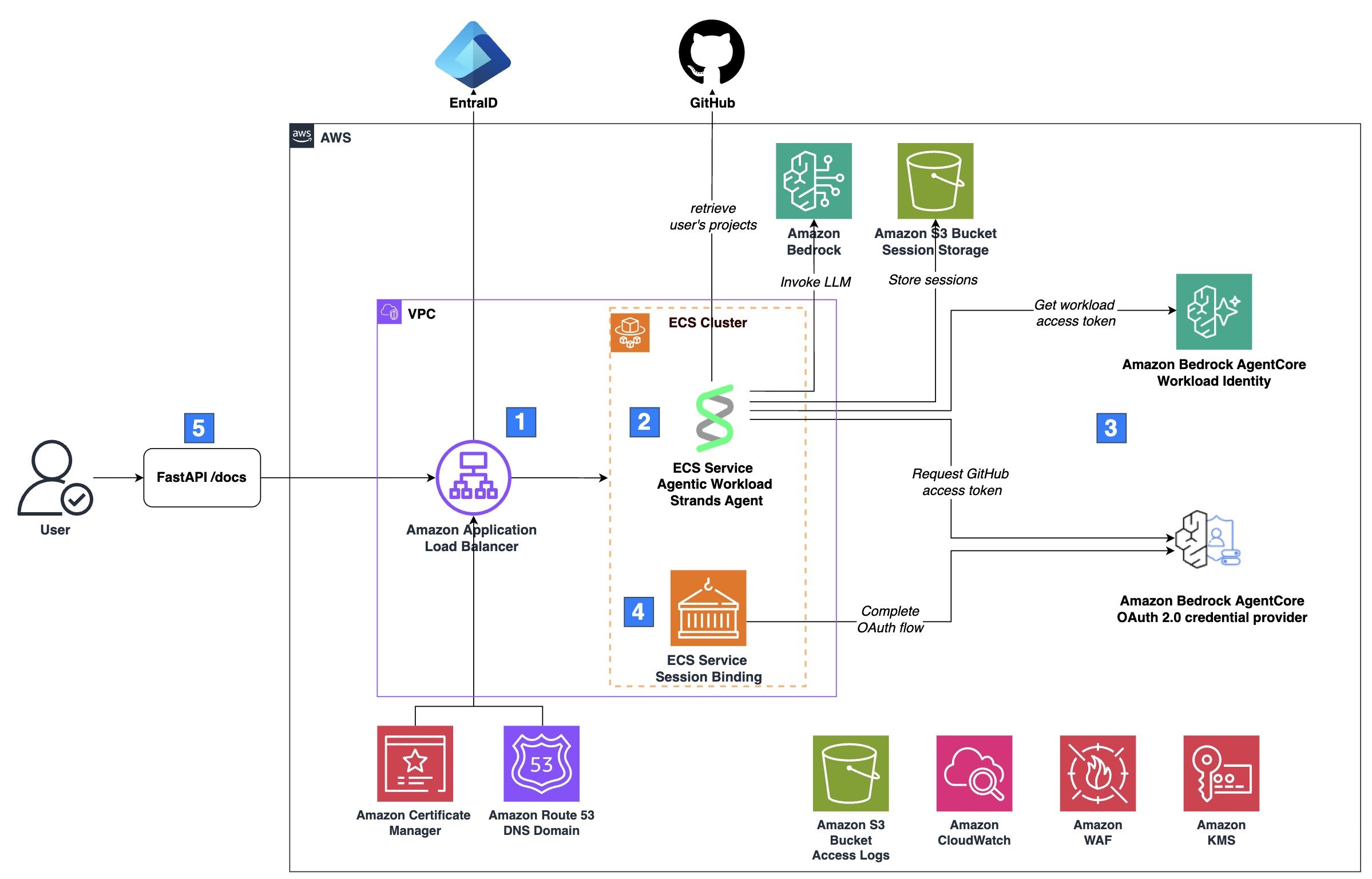
- Inbound authentication and traffic routing: Requests arrive at an Amazon Application Load Balancer (ALB), which authenticates the user through the ALB’s built-in OIDC authentication flow. Traffic is encrypted with HTTPS using a certificate from AWS Certificate Manager, and an alias A record in an Amazon Route 53 public hosted zone routes traffic to the load balancer. After authenticating the user through OIDC, the ALB forwards the request to the Amazon ECS cluster. The ALB injects an
x-amzn-oidc-dataheader containing the user’s claims in JWT format, with thesubfield uniquely identifying the user. - Agentic workload: The Agentic Workload exposes a FastAPI server with an
/invocationsendpoint that accepts a sessionId and message. The FastAPI server passes these to an agent built with Strands Agents. You can also use LangChain or other agent SDKs since the server handles requests independently of the agent framework. The agent calls a large language model (LLM) on Amazon Bedrock, but other model providers work, too. The agent stores session state in an Amazon S3 bucket and it uses the user’s sub claim as a key prefix to isolate sessions between users. The agent also has tools to perform actions on the user’s behalf in GitHub, which requires the user’s OAuth access token. - Outbound authentication with AgentCore Identity: When the agent needs to act on the user’s behalf in a third-party service like GitHub, it requests an OAuth access token through AgentCore Identity. If no valid token exists, AgentCore Identity initiates an Authorization Code Grant flow, prompting the user to authorize access.
- OAuth callback processing: After the user authorizes access, the Session Binding Service completes the OAuth flow by binding the authorization to the correct user session via AgentCore Identity.
- User interface: The FastAPI server that hosts the agentic workload exposes a
/docsendpoint, which renders the OpenAPI specification as an interactive HTML page. The end user interacts with the agent through this page, which provides a minimal UI for demonstration
Amazon CloudWatch captures logs, and a dedicated S3 bucket stores access logs for both the load balancer and the data bucket. ECS pulls container images from Amazon ECR. A set of basic AWS WAF rules is attached to the load balancer to provide baseline protection against common web exploits. An Amazon KMS customer managed key (CMK) encrypts data, except for the access logs bucket, which requires Amazon S3 managed encryption (SSE-S3).
Amazon Bedrock AgentCore Identity: Authorization Code Grant
This walkthrough adapts the general AgentCore Identity session binding flow for a self-hosted architecture using ALB for authentication, a dedicated Session Binding Service, and direct API calls instead of the AgentCore SDK and Runtime.
The sequence diagram shows how AgentCore Identity’s workload identity, workload access tokens, and OAuth 2.0 credential provider work together to securely provide OAuth tokens to the agent on behalf of a user. This flow assumes the authenticated user has not yet authorized the agent to access their resources, meaning no valid token exists in the AgentCore Identity Token Vault.
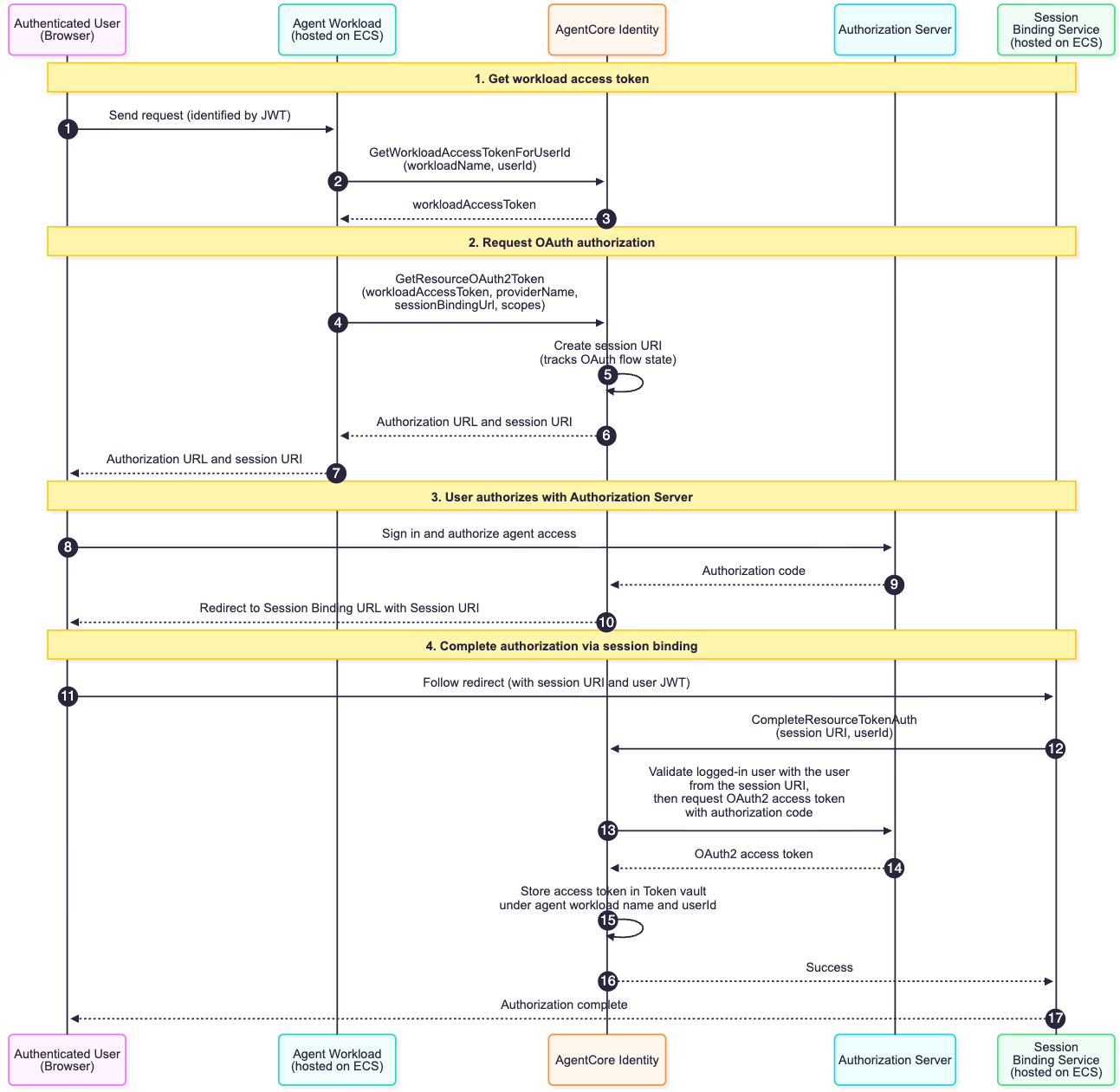
- An authenticated user sends a request to the agentic workload. The agentic workload extracts the user ID from the sub claim in the ALB-signed JWT (
x-amzn-oidc-dataheader) to identify the user. - The agentic workload calls the GetWorkloadAccessTokenForUserId API, passing the
userIdandworkloadName, to obtain a workload access token that represents the agent’s identity scoped to this user. - AgentCore Identity returns the workload access token to the agentic workload.
- The agentic workload calls the GetResourceOauth2Token API, passing the workload access token, the provider name of the configured OAuth 2.0 credential provider, a session binding URL (see callbackUrl parameter), and the required scopes, for instance the
read:userscope of GitHub. This requests an OAuth token for the third-party service (in this case, GitHub). - Because no valid token exists for this user, AgentCore Identity creates a sessionURI that tracks the authorization flow state across the subsequent requests and responses during the OAuth 2.0 authentication process.
- AgentCore Identity returns an authorization URL and session URI to the workload
- The agentic workload returns the authorization URL to the user, prompting them to authorize access.
- The user clicks the authorization URL and grants the agent permission in the third-party provider’s consent screen.
- The Authorization Server sends the authorization code to AgentCore Identity.
- AgentCore Identity redirects the user to the Session Binding URL with the session URI appended, routing them to the Session Binding Service.
- The user’s browser follows the redirect to the Session Binding Service via the Session Binding URL. The ALB injects the JWT in the
x-amzn-oidc-dataheader. - The Session Binding Service calls the CompleteResourceTokenAuth API with the session URI and user ID (extracted from the JWT), binding the completed authorization to the correct user session. On success, it returns a static application owned HTML page confirming the authorization was successful.
- AgentCore Identity exchanges the authorization code with the Authorization Server for an OAuth2 access token.
- The Authorization Server returns the OAuth2 access token.
- AgentCore Identity stores the token in the Token Vault.
- AgentCore Identity returns success to the Session Binding Service.
- The Session Binding Service displays “Authorization complete” to the user.
On subsequent requests, whether the user needs to re-authorize depends on the credentials the authorization server issued. AgentCore Identity stores both access tokens and refresh tokens (when available) in the Token Vault. When a refresh token is present — as with GitHub when User-to-server token expiration is enabled — AgentCore Identity automatically uses it to obtain a new access token once the original expires, without prompting the user again. If no refresh token was issued and the access token expires, the user will be prompted to re-authorize. Note that tokens can also be revoked on the provider side; in such cases, setting forceAuthentication: true forces a fresh authentication flow.
Session binding:
Session binding protects against two security threats:
Cross-Site Request Forgery (CSRF): An attacker attempts to bind their own OAuth token to the victim’s identity, causing the victim’s agent to unknowingly access the attacker’s resources, enabling data exfiltration and injection.
Browser Swapping Attack: An attacker tricks the victim into consenting on their behalf, binding the victim’s OAuth token to the attacker’s identity, granting the attacker direct access to the victim’s resources.
Session binding prevents both attacks by ensuring that the user ID at the agent workload matches the user ID at the Session Binding Service, with both identities cryptographically verified through the authentication chain.
AgentCore Identity also supports an optional customState parameter in the GetResourceOauth2Token API that can be used to pass a cryptographically random nonce to protect your callback endpoint against CSRF attacks, as recommended by the OAuth 2.0 specification.
Why we use GetWorkloadAccessTokenForUserId with AWS ALB and Microsoft Entra ID
The recommended API for obtaining a workload access token is GetWorkloadAccessTokenForJWT. This solution uses GetWorkloadAccessTokenForUserId instead.
GetWorkloadAccessTokenForJWT requires a dynamically validatable JWT whose signature can be verified at runtime against the issuer’s published signing keys, and whose aud claim matches your application. To obtain such a token from Microsoft Entra ID, you must include your Application ID in the scope of the OIDC authorization request, see the AgentCore Microsoft Inbound documentation for details.
However, this is incompatible with the AWS ALB OIDC flow.
As part of its OIDC handshake (see ALB OIDC documentation), the ALB sends the access token to Entra’s UserInfo endpoint to retrieve the authenticated user’s claims which is a mandatory step in the ALB’s authentication flow. This UserInfo endpoint is hosted on Microsoft Graph (https://graph.microsoft.com/oidc/userinfo), and it only accepts tokens scoped to Microsoft Graph. When you include your Application ID in the scope, the resulting access token has your application as the audience, the UserInfo endpoint rejects it with a 401 and the ALB returns a 561.
If you remove your Application ID from the scope, Entra defaults the access token audience to Microsoft Graph (00000003-0000-0000-c000-000000000000). The ALB handshake succeeds but the resulting JWT cannot be dynamically validated by AgentCore. It is unusable with GetWorkloadAccessTokenForJWT.
This solution: The ALB completes its handshake using the Graph-scoped token. The ALB forwards an ALB-signed JWT in the x-amzn-oidc-data header containing the user’s claims from the UserInfo endpoint, including a sub claim that uniquely identifies the authenticated user. We validate this ALB-signed JWT using AWS’s published signing keys, extract the sub, and pass it to GetWorkloadAccessTokenForUserId.
Implementation
View the complete code GitHub repository.
Obtaining the Workload Access Token
The server extracts the user ID from the JWT’s sub claim and requests a workload access token from AgentCore Identity. The server then uses this token, the session ID, and the message to invoke the agent on behalf of the user. Note that session ID here refers to the agent’s conversation session, not the OAuth session URI from the authorization flow.
Requesting the access token
The server uses the require_access_token decorator from AgentCore SDK to retrieve OAuth 2.0 access token, see Obtain OAuth 2.0 access token. We modify the decorator to accept the workload access token as an explicit parameter rather than resolving it internally, giving direct control over token lifecycle management while preserving the SDK’s token retrieval and error-handling logic
Our tool class uses this decorator to supply the access token when calling the GitHub API.
Each tool in the class uses this method, as shown below:
Three key design choices:
- Pydantic BaseModel as return types: GitHubUser and GitHubProject are
BaseModelsub-classes. Strands automatically derives tool descriptions from their schema and docstrings, giving the LLM structured context about each tool’s return type. - Type-consistent error handling: When no token exists and AgentCore Identity returns an authorization URL, the
on_auth_urlcallback raises anAuthorizationRequiredErrorrather than returning a string — a tool declaring GitHubUser as its return type cannot return a URL. The agent’s streaming layer catches the exception and surfaces the URL to the user. - Scopes per tool: Each tool declares only the OAuth scopes it needs, keeping consent aligned with the principle of least privilege.
Completing the OAuth session binding flow
Next, we look at the session binding service. When a user authorizes access in GitHub, GitHub redirects them to {session_binding_url}?session_id={session_id}, where session_id corresponds to the session URI that AgentCore Identity included in the original authorization URL. This ties the session binding request to the specific OAuth flow the agent initiated.
The service extracts the user ID from the sub claim in the x-amzn-oidc-data header, ensuring consistent identity across the flow. It then calls complete_resource_token_auth with the session URI and user ID, which binds the resulting access token to the correct user session.
Cleanup
To avoid incurring future charges, delete the resources created by this solution when they are no longer needed. Follow the instruction for cleaning up the resources.
Conclusion
In this post, you learned how to secure AI agents on Amazon ECS using Amazon Bedrock AgentCore Identity. You saw how inbound authentication verifies user identity via OIDC, how outbound authentication implements OAuth 2.0 with session binding, and how separating session binding from your agent workload enables independent scaling while protecting against attacks. This pattern works across different compute platforms, whether you run agents on ECS, EKS, Lambda, or outside AWS entirely. It also extends beyond GitHub to other OAuth 2.0-enabled services like Jira, Salesforce, or Google Calendar. Next steps:
- Review the complete code in GitHub to see the implementation
- Adapt the pattern to your OAuth provider, replace GitHub with your service
- Explore additional patterns in the AgentCore Identity Samples repository
- Read the post on AgentCore Runtime for managed agent hosting
- Dive into the AgentCore Identity documentation