I’m testing a kind-of ‘builders log’ where I’ll talk about the things I built this week, what worked, didn’t and give you guys something to tinker with this weekend.
I’ve been thinking about doing this for weeks but I like to really ‘see’ what the end output looks like before I run with it.
But that’s just procrastinating.
So I told myself I can’t open my new MacBook until i’ve sent this 🥹.
I’d appreciate feedback if you like this style of email and what you build with it!
Become a builder.
1.3k people signed up for this workshop I hosted last week [i’ll do more]. But Codex crapped out on me during it (hence the new MacBook). I wanted to put together a cookbook to go through everything.
It just ended up as a step-by-step tutorial. It’s boring. Are you going to read one screen then switch to your tool and do it? maybe.
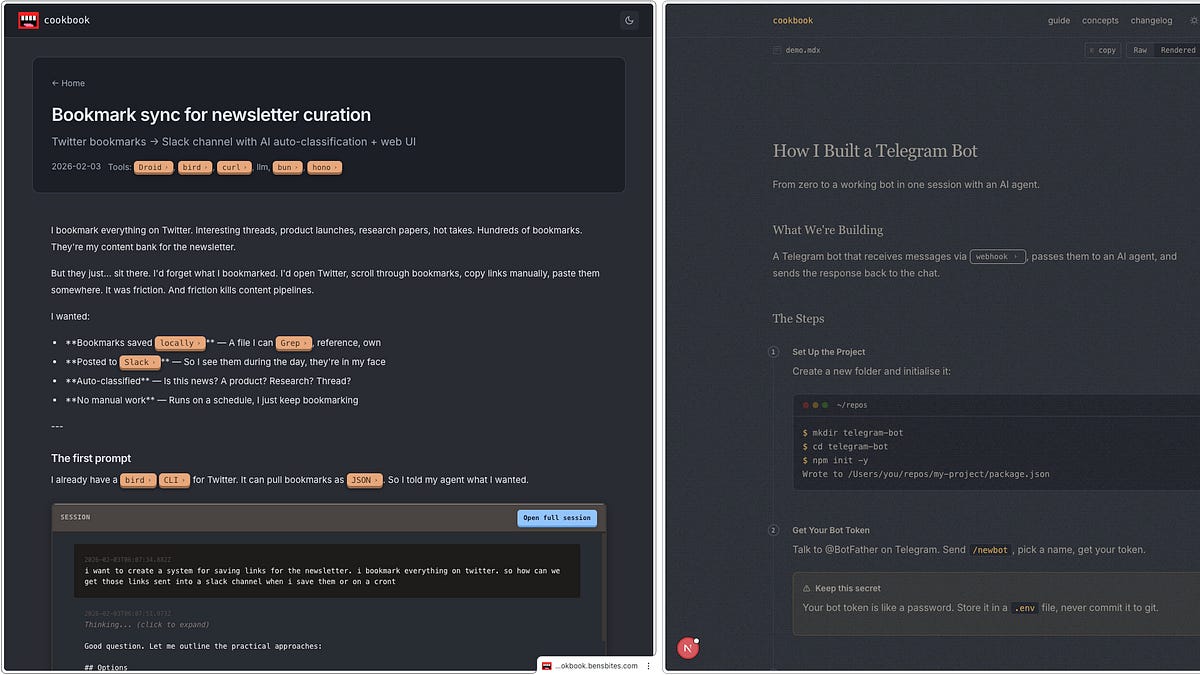
Instead, I’ve been working on an interactive cookbook you give to your agent and it teaches you as you’re building.
At the end, you’ll have built and deployed your own site with all the new concepts you covered whilst building it.
It’s been hard to get this cookbook right, so lets count this as alpha0.1. Please let me know how it went for you, what your site looks like, where it fell short etc and I’ll improve it.
What do to:
Open Codex/Claude Code desktop app
Create a new project folder
Open a chat session in that folder
Copy this url (the instructions) into your agent, hit enter:
https://gists.sh/bentossell/a4e5e7048e8a355ec56cf3db86169ae2
I recommend highly reading the agents output, look at what it was thinking in between your prompts.
Fill your site up with any concepts you don’t know and share them, I’d love to see.
Disclaimer: Codex may produce uglier designs than Claude.
Visualise skill.
One issue from the above cookbook was visualisations. I think it’s really helpful when learning about code systems.
All my attempts looked like 💩 and then Claude shipped their visualisations yesterday. Good timing.
So I reverse-engineered it and released it as a skill you can add to any agent. Codex still has poor design taste but it’s much better with the skill than without, trust me!
This is my first GitHub project to get over 200 stars!
Just give the link to your agent and say ‘install this skill’.
Ben’s Bites Cookbook site
A redesign, again.
The previous cookbook site had lots of dead weight from older versions so I wanted to start fresh.
Code is basically free nowadays after all!
It’s definitely not finished but in a decent place. This is where I want to upload a bunch of helpful docs to help you build stuff and see a breakdown of how I build stuff.
Still a wip! Not live yet. Needs another design pass - contrast is way off for a start.
Models. I always mix them.
GPT 5.4 XHigh for all ‘proper code’ - new features, new ideas etc
Opus 4.6 - for planning, research, less-technical tasks, design (always)
CLIs (terminal-based tools)
Droid for when I want to build something properly (their new missions feature is insane, can run for hours by itself and implement stuff end to end) - I’m an investor in the co
Pi is my new other favourite child. It’s very fast, and lightweight so your own instructions guide it a lot more than others
Both let you switch from GPT ←→ Claude models (or gemini, etc etc) in one conversation.
I use those in the terminal exclusively. I used Ghostty as my terminal app but now I use Cmux which has Ghostty in it, just has a nice sidebar for organising chats, draggable panels and a built-in browser. I do wish it had an easy way to view my files though - until then, I use Zed for that.
Agent Apps or whatever we’re calling these 3 panel agent interfaces;
Codex app - really nice user experience, super approachable
Claude Code/Cowork on the desktop app - I very rarely use these but have this week with some testing. I’m not won over by these yet.
T3 Code - this is nice, snappy and will support multiple agents but for now just Codex. Until it supports other agents I’ve not been reaching for it over Codex for GPT work.
Skills
What about skill prompt injection?
It can happen. I’ve not experienced it. Use reputable sources like Skills.sh (from Vercel) or just ask your agent to re-create the skill and check for any security issues. Tools like Codex app have acreate-skillskill you can use - just ask the agent.
Other tools
exe lets you spin up virtual servers really easily, has an in-built agent to help if you get stuck. Overall made it super easy for me to feel comfortable with servers - which I wasn’t previously.
here.now - im always spinning up sites for random ideas or even just to present info nicely so i can view it on the go. this is a free tool to give your sites a custom url in no-time at all.
Vercel. Vercel and Cloudflare are mortal enemies on X. I’ve got half of my deployed sites and domain names on both of these. I want to just pick a default one and Vercel’s edging it for me because I’m using a lot of their tools and skills. But honestly this could change by tomorrow.
gists.sh - I love tiny tools like this. GitHub has ‘gists’ which are quick ways to have a file on a url you can share or keep private - easily readable by agents. But it’s ugly. This tool makes them super nice to share - which is why I put my interactive cookbook in one.
Tools on my list to tinker with:
An AGENTS.md is a markdown file with instructions that the agent loads into its context at the start of any session.
Claude specifically looks for CLAUDE.md - but I just have mine symlinked to one another - ie if you look at claude.md it shows you the agents.md file. Ask your agent to set that up or to use dotagents
You can also paste these in to Codex/Claude desktop apps.
This is the build ‘loop’ that I’ve added.
Any agent I use follows it (italics are there for you - not included in the file):
create a /spec/ folder.
numbered 00_spec1.md, etc.
create a progress.md file for logging your progress through specs.
use agent-browser with dogfood before sending me a url to test.
When a feature is built, it spins up a browser and checks if any bugs or errors on the site - I used to do this manually, copying errors back to the agent, but now it does the loop itself. It doesnt catch every single bug but I’m trying to make sure my agents can use my sites as if it’s a real user. Sometimes these loops can take a while to run, depending on what you’re testing.
write good, efficient, fast tests with good coverage.
best practices, efficient, simplified code, avoid anti-patterns.
for code/dependencies/libraries etc you’re using, make sure you reference their docs.
First message: “feel the rhythm, feel the rhyme, get on up, its bobsled time.”
What’s in your agents.md? What should I add/take away?
What else would you want to know or see from me?
If you know a builder that’d find this useful, feel free to forward to them.
Its too late for me to open my MacBook - time to pick up the twins.
Have a great weekend!