In this article, you will learn how to build a fully functional AI agent that runs entirely on your own machine using small language models, with no internet connection and no API costs required.
Topics we will cover include:
- What AI agents and small language models are, and why running them locally is a practical and privacy-conscious choice.
- How to set up Ollama and the required Python libraries to run a language model on your own hardware.
- How to build a local AI agent step by step, adding tools and conversation memory to make it genuinely useful.
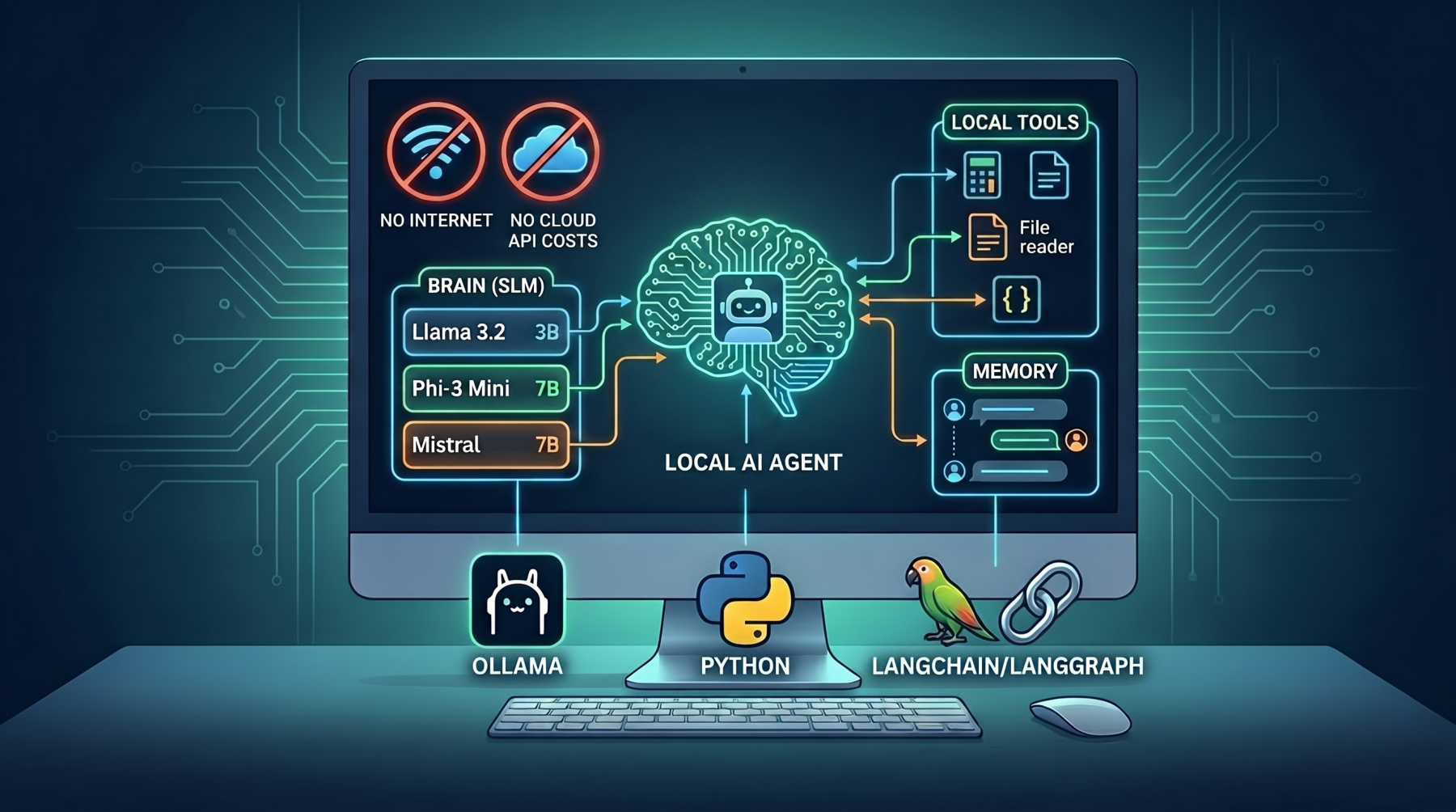
Building AI Agents with Local Small Language Models
Image by Editor
Introduction
The idea of building your own AI agent used to feel like something only big tech companies could pull off. You needed expensive cloud APIs, massive servers, and deep pockets. That picture has changed completely.
Today, developers &emdash; including those just starting out &emdash; can build fully functional AI agents that run entirely on their own computer, with no internet connection required (after initial setup and configuration) and no API bills to worry about. This is made possible by a new generation of small language models (SLMs): compact, efficient AI models that are powerful enough to reason, plan, and respond, yet light enough to run on a standard laptop or desktop.
In this article, you will learn how to build a local AI agent from scratch using the popular tools Ollama and LangChain/LangGraph. Whether you are a beginner who is just getting comfortable with Python or an intermediate developer exploring AI, this article is written for you.
What Are AI Agents?
An AI agent is a program that uses a language model to think, make decisions, and take actions in order to complete a goal. Unlike a regular chatbot that only responds to messages, an agent can:
- Break down a task into smaller steps
- Decide which tool or action to use next
- Use the result of one step to inform the next
- Keep going until the task is done
Think of it like the difference between a calculator and an assistant. A calculator waits for your input. An assistant thinks about your goal, figures out the steps, and works through them.
A basic agent has three parts:
| Part | What It Does |
|---|---|
| Brain (LLM/SLM) | Understands input and decides what to do |
| Memory | Stores context from earlier in the conversation |
| Tools | External functions the agent can call (e.g. search, calculator, file reader) |
What Are Small Language Models?
Small language models (SLMs) are AI models trained on large amounts of text data — similar to large models like GPT-4 — but designed to be much more lightweight.
Where GPT-4 might have hundreds of billions of parameters, an SLM like Phi-3, Mistral 7B, or Llama 3.2 (3B) has between 1 billion and 13 billion parameters. That makes them small enough to run on a regular computer with a modern CPU or a consumer-grade GPU.
Here are some popular SLMs worth knowing:
| Model | Developer | Size | Best For |
|---|---|---|---|
| Phi-3 Mini | Microsoft | 3.8B | Fast reasoning, low memory |
| Mistral 7B | Mistral AI | 7B | General tasks, instruction following |
| Llama 3.2 (3B) | Meta | 3B | Balanced performance |
| Gemma 2B | 2B | Lightweight, beginner-friendly |
If you are unsure which model to start with, go with Phi-3 Mini or Llama 3.2 (3B). They are well-documented, beginner-friendly, and perform well on local machines.
Why Run AI Agents Locally?
You might be wondering: why not just use the OpenAI API or Google Gemini?
Fair question. Here is why local SLMs are worth your attention:
- No API costs. Cloud-based models charge per token or per request. If your agent runs thousands of queries, the cost adds up fast. Local models run for free after setup.
- Full privacy. When you send data to a cloud API, it leaves your machine. For sensitive data like medical records, private business data, or personal documents, that is a real risk. Local models keep everything on your device.
- Works offline. No internet? No problem. Your agent keeps running.
- You are in control. You choose the model, the settings, and the behaviour. No rate limits, no usage policies getting in your way.
- Great for learning. Running models locally forces you to understand how everything fits together, which makes you a better developer.
Tools You Will Use
Here is a quick overview of the three tools this guide uses:
Ollama
Ollama is a free, open-source tool that lets you download and run language models on your local machine with a single command. It handles all the complex setup behind the scenes so you can focus on building.
LangChain / LangGraph
LangChain is a popular framework for building applications powered by language models. LangGraph is an extension of LangChain that helps you build agent workflows, defining how your agent thinks and acts step by step using a graph-based structure.
Setting Up Your Environment
Before you write any agent code, you need to set up your tools.
Step 1: Install Ollama
Go to ollama.com and download the installer for your operating system (Windows, Mac, or Linux). Once installed, open your terminal and pull a model:
This downloads the Phi-3 Mini model to your machine. To confirm it works, run:
You should see a prompt where you can chat with the model directly. Type /bye to exit.
Step 2: Install Python Libraries
Create a virtual environment and install the required packages:
For Linux/Mac:
source agent-env/bin/activate |
On Windows:
agent-env\Scripts\activate |
Install the required libraries:
pip install langchain langchain-ollama langgraph |
You need Python 3.9 or later. Check your version with:
Building Your First Local AI Agent
Now for the exciting part. Let us build a simple agent that can answer questions and use a basic tool — a calculator.
In your agent.py file, paste this:
|
1 2 3 4 5 6 7 8 9 10 11 12 13 14 15 16 17 18 19 20 21 22 23 24 25 26 27 28 29 30 31 32 33 34 35 36 37 |
from langchain_ollama import OllamaLLM from langchain.agents import AgentExecutor, create_react_agent from langchain.tools import tool from langchain import hub # Step 1: Load the local model via Ollama llm = OllamaLLM(model="phi3") # Step 2: Define a simple tool -- a calculator @tool def calculator(expression: str) -> str: """Evaluates a basic math expression. Input should be a valid Python math expression.""" try: result = eval(expression) return str(result) except Exception as e: return f"Error: {str(e)}" # Step 3: Bundle tools together tools = [calculator] # Step 4: Load a ReAct prompt template (Reason + Act pattern) prompt = hub.pull("hwchase17/react") # Step 5: Create the agent agent = create_react_agent(llm=llm, tools=tools, prompt=prompt) # Step 6: Wrap in an executor to handle the agent loop agent_executor = AgentExecutor(agent=agent, tools=tools, verbose=True) # Step 7: Run the agent response = agent_executor.invoke({ "input": "What is 245 multiplied by 18, and then divided by 5?" }) print("\n--- Agent Response ---") print(response["output"]) |
Here is what is happening:
- The
OllamaLLMclass connects to your locally running Phi-3 model. - The
@tooldecorator turns a regular Python function into a tool the agent can call. - The
create_react_agentfunction uses the ReAct pattern — a method where the agent reasons about the problem and then acts using a tool, repeatedly, until it has an answer. AgentExecutormanages the loop of reasoning, acting, and observing results.
Run the script:
You will see the agent’s thought process printed in the terminal before it produces the final answer.
Adding Memory and Tools to Your Agent
A real agent needs to remember what was said earlier in a conversation. Here is how to add conversation memory and a second tool — a simple knowledge base lookup.
In your agent_with_memory.py file:
|
1 2 3 4 5 6 7 8 9 10 11 12 13 14 15 16 17 18 19 20 21 22 23 24 25 26 27 28 29 30 31 32 33 34 35 36 37 38 39 40 41 42 43 44 45 46 47 48 49 50 51 |
from langchain_ollama import OllamaLLM from langchain.agents import AgentExecutor, create_react_agent from langchain.tools import tool from langchain.memory import ConversationBufferMemory from langchain import hub llm = OllamaLLM(model="phi3") # Tool 1: Calculator @tool def calculator(expression: str) -> str: """Evaluates a basic math expression.""" try: return str(eval(expression)) except Exception as e: return f"Error: {str(e)}" # Tool 2: Simulated knowledge base lookup @tool def knowledge_base(query: str) -> str: """Looks up information from a local knowledge base.""" kb = { "python": "Python is a beginner-friendly programming language widely used in AI and data science.", "ai agent": "An AI agent is a program that uses a language model to reason and take actions.", "ollama": "Ollama is a tool for running language models locally on your computer.", } for key in kb: if key in query.lower(): return kb[key] return "No information found for that query." tools = [calculator, knowledge_base] # Add memory to track conversation history memory = ConversationBufferMemory(memory_key="chat_history", return_messages=True) prompt = hub.pull("hwchase17/react-chat") agent = create_react_agent(llm=llm, tools=tools, prompt=prompt) agent_executor = AgentExecutor( agent=agent, tools=tools, memory=memory, verbose=True ) # Multi-turn conversation print(agent_executor.invoke({"input": "What is an AI agent?"})["output"]) print(agent_executor.invoke({"input": "Now tell me what Ollama is."})["output"]) print(agent_executor.invoke({"input": "Calculate 50 multiplied by 12."})["output"]) |
Note: eval() is used here for instructional purposes, but should never be used on untrusted input in production code.
With ConversationBufferMemory, the agent remembers your previous messages in the same session. This makes it behave more like a real assistant rather than a stateless chatbot.
Limitations to Know
Running AI agents locally with SLMs is powerful, but it is important to be honest about the trade-offs:
- Smaller models make more mistakes. SLMs are not as capable as GPT-4 or Claude. They can hallucinate — confidently give wrong answers — more often, especially on complex tasks.
- Speed depends on your hardware. If you do not have a GPU, your model may run slowly. Expect 5–30 seconds per response depending on your machine.
- Context length is limited. Most SLMs can only handle shorter conversations before they “forget” earlier messages. This is a known limitation of smaller models.
- Complex reasoning is harder. Multi-step logic, advanced coding tasks, or nuanced instructions may not work as well as they would with a larger cloud model.
When to use local SLMs: For prototyping, learning, privacy-sensitive projects, offline use cases, and applications where the cost of cloud APIs is a concern.
When to use cloud models: For production applications that demand high accuracy, handle complex tasks, or serve many users simultaneously.
Conclusion
Building AI agents with local small language models is no longer a niche skill reserved for AI researchers. With tools like Ollama and LangChain/LangGraph, any developer with a working Python environment can have a local agent running in under an hour.
Here is what you covered in this article:
- What AI agents are and how they work
- What small language models are, and which ones are worth using
- Why running AI locally gives you privacy, control, and zero API cost
- How to set up Ollama and your Python environment
- How to build a working agent with a calculator tool
- How to add memory and multiple tools to make your agent smarter
The best way to learn this deeply is to build something. Start with the code examples in this guide, swap in a different model (I suggest you try Mistral 7B next), and keep adding tools until your agent can do something genuinely useful to you.